
Deciding whether to hire someone to build your online store can look simple at first.
Choose a platform, add some products, connect payments, publish the website, and start selling.
In reality, a working ecommerce site involves many decisions that are easy to underestimate:
- Store structure
- Product organization
- Checkout flow
- Payment setup
- Shipping rules
- Taxes
- Mobile usability
- Search
- Security
- Analytics
- Integrations
- Performance
- Ongoing maintenance
This creates an important question:
Should you build the online store yourself, or hire someone to build it for you?
There is no universal answer.
Some businesses can launch successfully with a simple DIY store. Others save significant time, reduce mistakes, and create a stronger foundation by hiring an experienced developer or ecommerce specialist.
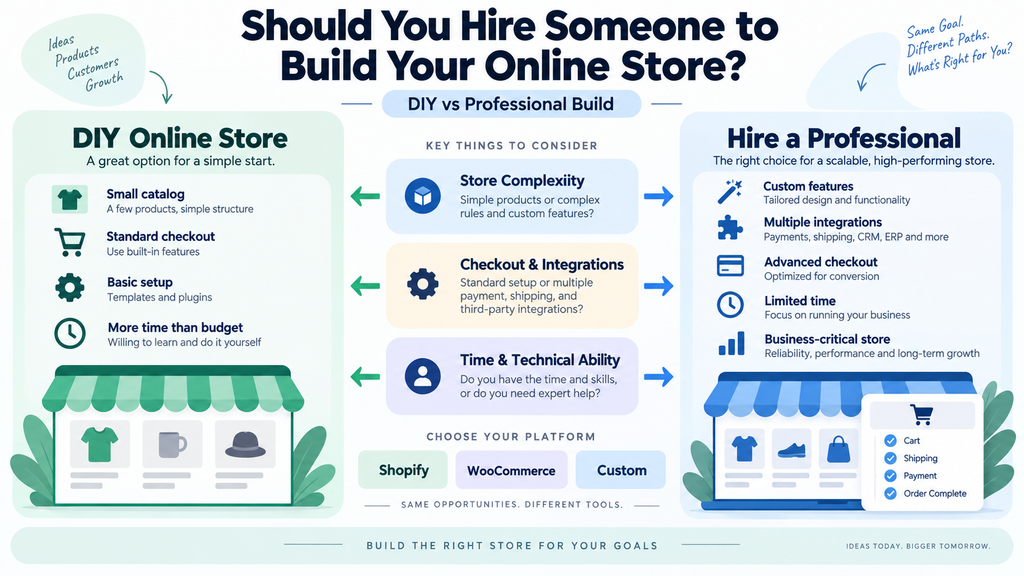
The right decision depends on the complexity of the store, your technical ability, your available time, and how important the website is to the business.
This guide explains how to decide.
Start With the Store You Actually Need
Before deciding who should build the store, define what the store needs to do.
A simple online store may only require:
- A homepage
- Product categories
- Product pages
- Cart
- Checkout
- Payment processing
- Shipping settings
- Contact information
- Basic policies
A more complex store may require:
- Product variations
- Subscription products
- Customer accounts
- Wholesale pricing
- Multiple currencies
- International shipping
- Inventory syncing
- ERP integration
- CRM integration
- Custom discounts
- Advanced search
- Product filtering
- Booking systems
- Memberships
- Custom checkout logic
- Marketplace functionality
These are very different projects.
A store selling ten simple products is not the same as a store managing hundreds of SKUs, multiple warehouses, wholesale customers, subscriptions, and external business systems.
The more complicated the operation becomes, the stronger the case for professional help.
When Building the Store Yourself Can Make Sense
Hiring someone is not automatically the best choice.
Modern ecommerce platforms have made it possible for many small businesses to create functional stores without custom development.
A DIY approach may work well when several conditions are true.
1. Your Store Is Simple
If you have:
- A small product catalog
- Standard product types
- Simple shipping
- One main market
- Standard payment methods
- No unusual business logic
then a platform such as Shopify or WooCommerce may already provide most of what you need.
You may be able to choose a theme, add products, configure payments, and launch without major custom work.
2. You Are Comfortable Learning New Tools
Building an online store still requires learning.
You may need to understand:
- Product configuration
- Image optimization
- Theme settings
- Shipping zones
- Taxes
- Payment gateways
- Domain settings
- Apps or plugins
- Basic SEO
- Analytics
- Store policies
If you enjoy learning software and can work through documentation carefully, this may be manageable.
If every technical problem becomes frustrating or takes several hours to solve, the DIY approach can become expensive in a different way: lost time.
3. You Have More Time Than Budget
For a new business, conserving cash may be more important than conserving time.
In that situation, building the first version yourself can be reasonable.
The goal does not need to be a perfect store.
It can simply be:
Create a functional first version, test whether customers actually buy, then improve it based on real demand.
This is often better than investing heavily in advanced features before the business model is proven.
4. The Website Is Not Yet Business-Critical
If the online store is an experiment or secondary sales channel, a simple DIY setup may be enough.
For example, a local business may mainly sell offline but want to test a small ecommerce section.
The risk of technical problems is lower because the entire business does not depend on the website.
When You Should Hire Someone to Build Your Online Store
Professional help becomes more valuable when the store is important, complicated, or difficult to get right.
Here are some of the strongest signs.
1. Ecommerce Is a Core Sales Channel
If the website will be responsible for a significant portion of revenue, the cost of mistakes increases.
A broken product page is not just a design issue.
A failed checkout can mean lost sales.
A payment error can create support problems.
A slow site can reduce conversions.
An incorrect shipping rule can create financial losses.
When the store directly affects revenue, reliability matters more.
Professional setup can reduce avoidable problems before customers encounter them.
2. You Need Custom Functionality
Many ecommerce platforms are designed around common use cases.
Problems begin when the business works differently.
Examples include:
- Custom product builders
- Complex pricing rules
- B2B customer tiers
- Wholesale ordering
- Product personalization
- Custom booking flows
- Quote requests
- Deposits
- Subscription logic
- Marketplace sellers
- Membership access
- Custom shipping calculations
- Integration with internal systems
Sometimes an app or plugin can solve the problem.
Sometimes several tools must work together.
Sometimes custom development is required.
This is where technical experience becomes much more important.
3. You Need Multiple Systems to Work Together
An online store rarely exists in isolation.
It may need to connect with:
- Payment processors
- Shipping providers
- Email marketing platforms
- CRM systems
- Inventory software
- Accounting systems
- ERP systems
- Customer support tools
- Analytics
- Advertising platforms
- Fulfillment services
- Automation platforms
The difficulty is not simply installing each tool.
The real question is:
Do they work together correctly?
For example:
A customer places an order.
The payment must succeed.
Inventory must update.
The order may need to reach a fulfillment provider.
The customer should receive the correct email.
The CRM may need a new customer record.
Analytics should record the purchase.
The accounting system may need transaction data.
When several systems are connected, small configuration mistakes can create large operational problems.
4. You Have a Large Product Catalog
Adding products manually is relatively simple when there are ten products.
It becomes much more complicated with hundreds or thousands.
Large catalogs may involve:
- Categories
- Tags
- Attributes
- Variations
- SKUs
- Inventory
- Product images
- SEO data
- Shipping weights
- Pricing
- Wholesale data
- Product feeds
The store also needs a logical navigation structure so customers can find products.
Without proper planning, large stores quickly become difficult to manage.
5. You Need Better Conversion Design
A functioning store is not necessarily an effective store.
Visitors still need to move through a decision process.
A good ecommerce experience should make it easy to:
- Understand the product
- Compare options
- Find important information
- Trust the business
- Add items to the cart
- Understand shipping
- Complete checkout
Small design decisions can influence this process.
For example:
- Are product benefits easy to scan?
- Are variation choices understandable?
- Is the Add to Cart button easy to find?
- Are shipping expectations clear?
- Are return policies visible?
- Does checkout contain unnecessary friction?
- Does the store work well on mobile?
An experienced ecommerce designer or developer should think beyond appearance.
The objective is to help customers buy.
6. You Do Not Have Time to Build the Store
DIY ecommerce often looks inexpensive because the business owner is not paying themselves for their time.
But time still has value.
Suppose building the store requires weeks of:
- Learning
- Troubleshooting
- Configuring
- Testing
- Fixing
- Rebuilding
During that time, the owner may not be:
- Finding customers
- Developing products
- Talking to suppliers
- Improving operations
- Creating marketing campaigns
- Serving existing customers
The right comparison is not only:
How much does a developer cost?
It is also:
What could I be doing instead of building this myself?
7. You Need the Store Launched on a Real Deadline
A business may need to launch before:
- A product release
- A seasonal campaign
- A trade show
- A marketing campaign
- A holiday sales period
- A partnership launch
When the deadline matters, experimenting with unfamiliar technology can become risky.
Professional help does not guarantee that nothing will go wrong, but an experienced team should be better at estimating work, identifying dependencies, and planning testing.
8. You Are Migrating an Existing Store
Store migration deserves special attention.
Moving from one ecommerce platform to another can involve:
- Products
- Product variations
- Customers
- Orders
- Images
- Categories
- URLs
- SEO metadata
- Reviews
- Coupons
- Customer accounts
- Redirects
A migration can appear successful while still creating hidden problems.
For example:
Old Google URLs may suddenly return 404 errors.
Product variations may import incorrectly.
Customer accounts may not work.
Historical orders may be incomplete.
Analytics tracking may disappear.
This is usually not the best type of project for a first-time DIY ecommerce build.
Shopify, WooCommerce, or Another Platform?
One of the first decisions is platform selection.
There is no single platform that is best for every business.
The correct choice depends on the business model.
Shopify
Shopify is often attractive for businesses that want a managed ecommerce platform. Its official setup documentation is also useful for checking what the platform handles natively before paying for custom work.
It handles much of the infrastructure, including hosting and core platform maintenance.
It can be a strong fit when the business wants:
- A relatively straightforward store setup
- Managed hosting
- A large app ecosystem
- Standard ecommerce workflows
- Less infrastructure management
However, businesses should still evaluate:
- App dependency
- Custom functionality
- Subscription costs
- Platform limitations
- Checkout customization
- International requirements
WooCommerce
WooCommerce can be attractive for businesses that want more control over a WordPress-based website.
It can work particularly well when ecommerce is part of a broader content or business website.
Potential advantages include:
- Flexible content management
- Large plugin ecosystem
- Greater hosting control
- Extensive customization possibilities
- Integration with WordPress content
But that flexibility also creates more responsibility.
You need to think about:
- Hosting
- Updates
- Security
- Backups
- Plugin compatibility
- Performance
A poorly maintained WooCommerce store can become difficult to manage.
Other Ecommerce Platforms
Depending on the business, alternatives may include platforms focused on:
- Enterprise ecommerce
- Headless commerce
- Digital products
- Memberships
- Marketplace models
- B2B ecommerce
- Regional markets
The mistake is choosing a platform based only on popularity.
The better question is:
Which platform supports the way this business actually needs to sell?
What Should an Ecommerce Developer Actually Do?
Hiring someone should involve more than installing a theme.
A strong ecommerce project normally includes several stages.
1. Requirements Planning
Before building anything, the developer should understand:
- Products
- Customers
- Markets
- Payment methods
- Shipping
- Taxes
- Inventory
- Business workflows
- Integrations
- Future plans
Without this step, the store may be designed around assumptions instead of actual business needs.
2. Store Architecture
This includes planning:
- Main navigation
- Categories
- Collections
- Product organization
- Search
- Filters
- Account areas
- Policy pages
- Content pages
The goal is to help customers find what they need.
3. Design and User Experience
Important decisions include:
- Homepage layout
- Product page structure
- Category pages
- Cart experience
- Checkout flow
- Mobile layout
- Calls to action
- Trust signals
The design should reflect the brand, but usability should remain the priority.
4. Technical Setup
This may include:
- Platform installation or configuration
- Domain connection
- SSL
- Payment gateways
- Shipping rules
- Taxes
- Email notifications
- Analytics
- Apps or plugins
- APIs
- Automations
5. Product Setup
Depending on the agreement, the project may also include:
- Product imports
- Categories
- Variations
- Product imagery
- Pricing
- Inventory
- Product descriptions
This should be clarified before the project begins.
6. Testing
Testing is one of the most important stages.
A store should be tested across:
- Desktop
- Tablet
- Mobile
And through real workflows:
- Browse products
- Search
- Filter
- Add to cart
- Update quantities
- Apply discounts
- Calculate shipping
- Complete checkout
- Receive emails
- Create an account
- Reset a password
- Cancel or refund an order where appropriate
A checkout page that looks correct but cannot complete an order is not ready.
Questions to Ask Before Hiring Someone
Hiring the right person requires more than looking at screenshots of previous websites.
Consider asking these questions.
Have You Built Similar Stores?
Relevant experience can matter more than general web development experience.
Someone may be excellent at building company websites but have limited experience with:
- Payments
- Checkout
- Product variations
- Inventory
- Ecommerce security
Ask about projects with similar complexity.
Which Platform Do You Recommend, and Why?
Be cautious if the answer is simply:
“I always use this platform.”
The recommendation should be connected to your requirements.
What Is Included?
Clarify whether the project includes:
- Design
- Development
- Product entry
- Payment setup
- Shipping
- Taxes
- Mobile optimization
- Integrations
- Analytics
- SEO basics
- Testing
- Training
- Post-launch support
Many project disagreements begin because each side assumed something different.
Who Provides the Content?
Determine who is responsible for:
- Product descriptions
- Images
- Policies
- Brand assets
- Product specifications
- Shipping information
Waiting for missing content can delay an otherwise finished project.
Who Owns the Store?
You should understand ownership of:
- Domain
- Hosting
- Platform account
- Theme
- Plugins or apps
- Source code
- Admin credentials
- Analytics accounts
The business should not become unnecessarily dependent on a developer simply to access its own systems.
What Happens After Launch?
Stores require ongoing work.
Ask who handles:
- Updates
- Backups
- Bugs
- App conflicts
- Performance issues
- Security
- New features
- Platform changes
This is particularly important for self-hosted platforms.
Freelancer, Agency, or In-House?
Businesses also need to decide what type of help they need.
Freelancer
A freelancer can be a strong choice for:
- Smaller stores
- Specific improvements
- Theme customization
- Store setup
- Integrations
- Technical fixes
The main consideration is whether one person has all the skills required by the project.
Agency
An agency may make more sense when the project requires several disciplines, such as:
- Strategy
- UX design
- Development
- Copywriting
- SEO
- Integration
- Marketing
But larger teams also introduce additional coordination.
The size of the provider should match the complexity of the project.
In-House Team
An internal ecommerce team becomes more relevant when the store requires continuous development and operations.
For example:
- Large ecommerce businesses
- Frequent product releases
- Complex internal systems
- Heavy customization
- Ongoing experimentation
For many small businesses, this is unnecessary at the beginning.
Common Mistakes When Hiring Someone
Professional help does not automatically guarantee a good result.
Businesses still need to manage the project carefully.
Choosing Only by the Lowest Quote
A low price can be reasonable.
But if the quote excludes important work such as:
- Testing
- Mobile optimization
- Product setup
- Integrations
- Support
the final project may cost more than expected.
Compare scope, not just the number.
Asking for Features Without Understanding Why
A feature list can become expensive very quickly.
Before adding something, ask:
What business problem does this solve?
If there is no clear answer, it may not belong in the first version.
Ignoring Ongoing Costs
An online store may require ongoing expenses such as:
- Platform plans
- Hosting
- Apps
- Plugins
- Payment processing
- Email systems
- Maintenance
- Premium integrations
Consider the complete operating model, not only the initial build.
Failing to Test the Checkout
This mistake is surprisingly common.
Before launch, complete real test orders.
Check:
- Payment
- Shipping
- Tax
- Confirmation emails
- Order records
- Inventory
- Mobile checkout
Do not assume that because checkout loads, it works.
What Should You Build First?
For many small businesses, the best approach is not to launch every possible ecommerce feature at once.
A phased approach can reduce risk.
Phase 1: Essential Store
Start with:
- Core products
- Essential categories
- Product pages
- Cart
- Checkout
- Payments
- Shipping
- Policies
- Analytics
- Basic SEO
- Mobile optimization
The objective is to start selling.
Phase 2: Improve the Buying Experience
Once real customers use the store, you may discover that they need:
- Better search
- More filters
- Product comparison
- Reviews
- Improved product information
- Faster checkout
- Better mobile navigation
These improvements are based on real behavior rather than guesses.
Phase 3: Automation and Integrations
As order volume grows, the business may benefit from:
- CRM automation
- Inventory syncing
- Shipping automation
- Accounting integration
- Customer support workflows
- Email sequences
- AI-assisted support
Automation becomes more valuable when there is an existing repetitive process to automate.
A Simple Decision Framework
If you are still unsure whether to hire someone, ask yourself the following questions.
Can I Build the Required Store With Standard Platform Features?
If yes, DIY may be realistic.
If no, professional help becomes more valuable.
Do I Understand Payments, Shipping, Taxes, and Checkout?
If not, there is more risk than simply getting the design wrong.
Can I Afford the Time?
If building the store will take you away from product, marketing, or customers for weeks, hiring someone may be more efficient.
Is the Store Important to Revenue?
The more important the store is, the less attractive trial-and-error becomes.
Do I Need Integrations or Custom Logic?
If yes, specialist help is often worthwhile.
DIY, Professional Build, or Hybrid?
The decision does not have to be all-or-nothing.
A hybrid approach can work well.
For example, the business owner might:
- Prepare products
- Write descriptions
- Organize images
- Define categories
- Create policies
while a developer handles:
- Platform configuration
- Theme setup
- Payments
- Shipping
- Integrations
- Performance
- Testing
This can reduce unnecessary development work while keeping the technically sensitive parts in experienced hands.
Before Launch: Ecommerce Checklist
Whether you build the store yourself or hire someone, test these areas before launch.
Products
- Product titles are correct
- Prices are correct
- Variations work
- Images display properly
- Inventory is correct
- Descriptions are complete
Navigation
- Categories make sense
- Search works
- Filters work
- Important pages are easy to find
Cart
- Products can be added
- Quantities can be changed
- Products can be removed
- Discounts work where applicable
Checkout
- Payments work
- Shipping calculates correctly
- Taxes behave correctly
- Required fields work
- Mobile checkout works
Communication
- Order confirmation emails arrive
- Customer support information is visible
- Refund and return information is available
Technical
- HTTPS works
- Backups are configured
- Analytics works
- Error pages are acceptable
- Pages load properly
- Mobile layouts have been tested
Operations
- Orders reach the correct system
- Inventory updates
- Fulfillment receives necessary information
- Staff know how to process orders
The Bottom Line
You do not automatically need to hire someone to build an online store.
A simple business with a small catalog and standard requirements may be able to launch successfully with a modern ecommerce platform and a carefully chosen theme.
Hiring professional help becomes more valuable when:
- Ecommerce is important to revenue
- The store has complex requirements
- You need integrations
- You need custom functionality
- You are migrating an existing store
- You have a large catalog
- You have a fixed launch deadline
- You do not have time to learn and troubleshoot the platform
- Technical errors would significantly affect the business
The decision should not be based on whether building a store yourself is technically possible.
Today, it often is.
The better question is:
Is building and maintaining this store the best use of your time, and what is the cost of getting the important parts wrong?
For some businesses, DIY is the right first step.
For others, hiring someone allows the owner to stay focused on products, customers, marketing, and operations while the technical foundation is handled properly.
The right solution is the one that matches the complexity and importance of the store — not the one with the most features.
Related reading: how to plan an online store before building it, professional website cost factors, and setting a realistic website scope.
If you are ready to scope the store itself, see SiteLumo’s Ecommerce Websites service or request a quote.