
A clear website scope defines what a website project will include before design and development begin.
It answers practical questions such as:
- How many pages are needed?
- What content must be prepared?
- Which features are essential?
- Which integrations are required?
- What needs to work at launch?
- Which ideas can wait until later?
Without a defined scope, a simple website project can gradually turn into something much larger.
A business may begin by planning a homepage, several service pages, and a contact form. Then someone suggests online booking. Later, customer accounts seem useful. Then a multilingual version is added, followed by a customer portal, live chat, advanced search, and several new integrations.
None of those ideas are necessarily bad.
The problem is trying to build everything at once without deciding which parts are actually necessary.
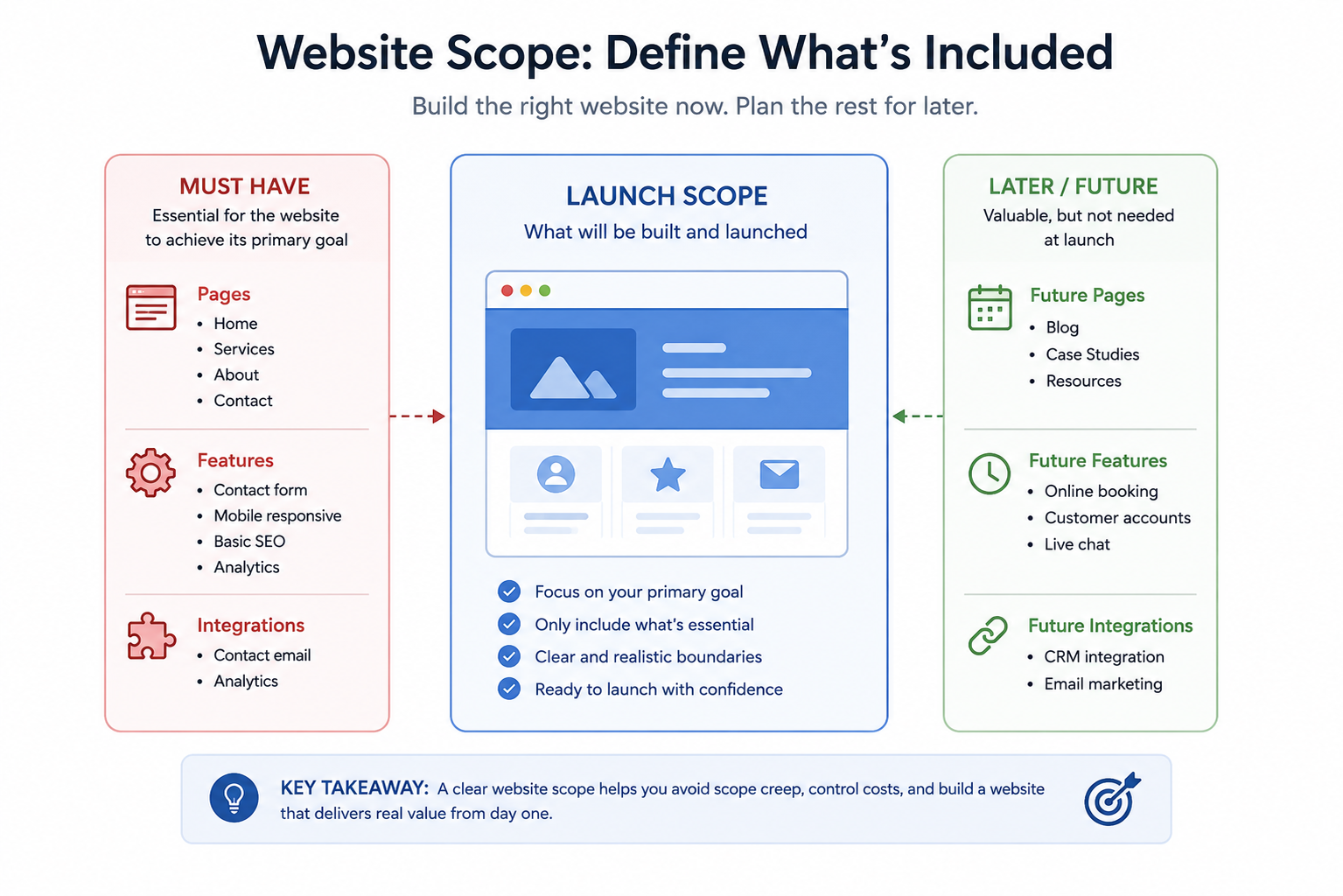
A realistic website scope helps you create the website you need now while leaving room to improve it later.
What Does Website Scope Mean?
Website scope is the agreed boundary of a website project.
It describes what is included in the current build and, just as importantly, what is not included.
A basic scope might say that a website includes:
- Home
- Services
- About
- Contact
- five individual service pages;
- a contact form;
- mobile-responsive layouts;
- basic search optimization;
- analytics setup;
- legal pages supplied by the business.
A more complex website might also include:
- ecommerce;
- customer accounts;
- booking;
- multilingual content;
- custom integrations;
- searchable databases;
- membership features.
The scope should be specific enough that someone can understand what is being built without having to guess.
It does not need to describe every design detail.
You are defining the boundaries of the project, not designing every page in advance.
Why Website Scope Matters
Website projects contain many connected decisions.
Adding one seemingly small requirement can create additional work elsewhere.
For example, imagine adding customer accounts.
That may also require:
- registration;
- login;
- password reset;
- account pages;
- privacy considerations;
- email notifications;
- account security;
- testing for logged-in and logged-out users.
Or imagine adding another language.
That may require:
- translated page content;
- translated navigation;
- translated forms;
- translated metadata;
- language switching;
- URL decisions;
- ongoing translation when content changes.
This is why feature count alone does not accurately describe project size.
A realistic scope helps you see the consequences of a requirement before committing to it.
Scope Is Not the Same as a Website Requirements Checklist
The two are closely related, but they serve different purposes.
A website requirements checklist identifies what the website may need.
For example:
- appointment booking;
- six service pages;
- contact form;
- blog;
- analytics;
- CRM integration.
The website scope decides which of those requirements belong in the current project.
For example:
Launch scope
- six service pages;
- contact form;
- analytics.
Later phase
- appointment booking;
- CRM integration.
Not currently needed
- blog.
Requirements help you collect needs.
Scope helps you make decisions about those needs.
Start With the Primary Goal
A realistic scope begins with the main purpose of the website.
Ask:
What is the most important thing this website needs to help the business accomplish?
Examples include:
- generate inquiries;
- receive bookings;
- sell products;
- explain professional services;
- showcase previous work;
- provide information to customers;
- collect applications.
This matters because features should support the goal rather than exist simply because they are available.
For example, suppose the primary goal is:
Generate quote requests for a local landscaping company.
The website may genuinely need:
- clear service pages;
- project photographs;
- service areas;
- testimonials;
- contact information;
- quote request form.
It probably does not need, at launch:
- customer accounts;
- discussion forums;
- advanced site search;
- membership features.
The primary goal gives you a filter for deciding what belongs in the scope.
Define the Minimum Useful Website
A useful way to control scope is to ask:
What is the smallest version of this website that would still do its job properly?
This does not mean building a poor or unfinished website.
It means removing features that do not materially improve the website’s ability to achieve its goal.
For a small consulting business, the minimum useful website might be:
- Home
- Services
- About
- Case Studies
- Contact
For a restaurant:
- Home
- Menu
- About
- Location and Hours
- Reservations
For an online store:
- Home
- Product Categories
- Product Pages
- Cart
- Checkout
- Shipping Information
- Returns
- Contact
Start there.
You can add additional ideas after the essential structure is clear.
Step 1: Define the Pages Included in the Scope
Begin with the sitemap.
Write down every page that needs to exist when the website launches.
For example:
Main pages
- Home
- About
- Services
- Work
- FAQ
- Contact
Service pages
- Service A
- Service B
- Service C
Utility pages
- Privacy Policy
- Terms
This immediately creates a clearer project than saying:
We need a business website.
Count page types, not only page numbers
Two websites can both contain ten pages while requiring very different amounts of work.
For example:
Website A
- Home
- About
- eight simple service pages.
Website B
- Home
- Store
- Product Category
- Product Detail
- Cart
- Checkout
- Account
- Booking
- Search Results
- Contact
Both contain roughly the same number of page types or URLs, but Website B has far more functionality.
So the scope should identify what kinds of pages are being created, not only the total number.
Step 2: Decide What Content Is Included
Every page needs content.
That may include:
- written copy;
- headings;
- photographs;
- illustrations;
- videos;
- testimonials;
- product information;
- team biographies;
- downloadable files;
- FAQs.
Define where that content comes from.
For example:
Business supplies
- logo;
- service descriptions;
- photographs;
- testimonials;
- staff details.
Created during project
- page structure;
- content formatting;
- image placement;
- page headings.
The exact responsibilities will vary, but they should be clear.
A website project can appear delayed because “the page is not finished” when the real problem is that the required content has never been supplied.
Step 3: Separate Pages From Features
A page is not the same as a feature.
A Contact page is a page.
A form that validates information, uploads files, sends notifications, stores submissions, and creates a CRM lead is functionality.
Create two separate lists.
Pages
- Home
- About
- Services
- Contact
Features
- contact form;
- file upload;
- appointment booking;
- map;
- newsletter signup.
This makes the project easier to understand.
It also prevents a single line such as “Contact page” from hiding several technical requirements.
Step 4: Classify Features as Essential, Useful, or Future
Now review every proposed feature.
Put each one into one of three groups.
Essential
The website cannot properly achieve its primary goal without it.
Examples:
- checkout for an ecommerce store;
- reservation function for a booking-focused business;
- quote form for a business that receives detailed project requests.
Useful
The feature would improve the website but is not essential for launch.
Examples:
- newsletter signup;
- advanced testimonials;
- comparison tools;
- optional live chat.
Future
The feature may be valuable later, but there is no strong reason to delay launch for it now.
Examples:
- customer portal;
- loyalty program;
- advanced automation;
- complex reporting dashboard.
This exercise can dramatically reduce unnecessary scope.
It does not mean abandoning future ideas.
It means putting them in the correct phase.
Step 5: Question Every “It Would Be Nice If…”
One of the biggest causes of scope growth is the phrase:
“It would be nice if the website could also…”
That sentence often introduces functionality without first identifying the problem it solves.
Whenever a new idea appears, ask:
- What problem does this solve?
- Who will actually use it?
- How often will they use it?
- Is it required for launch?
- Can an existing tool handle it?
- What additional work does it create?
- Can it be added later without rebuilding the website?
These questions do not automatically mean the feature should be rejected.
They simply require the feature to justify its place in the project.
Step 6: Understand That Features Have Hidden Scope
A feature rarely consists of only the visible interface.
Consider online booking.
The visible part may look simple:
Choose Date → Choose Time → Confirm
But the full requirement may include:
- availability rules;
- time zones;
- appointment duration;
- unavailable dates;
- confirmation email;
- cancellation;
- rescheduling;
- staff calendars;
- payment;
- reminders;
- calendar synchronization.
The same applies to many common features.
Ecommerce
“Add a store” may involve:
- products;
- variations;
- inventory;
- payments;
- taxes;
- shipping;
- emails;
- customer accounts;
- refunds;
- order management.
Membership
“Add member accounts” may involve:
- registration;
- login;
- password recovery;
- permissions;
- restricted pages;
- profiles;
- emails;
- privacy;
- account deletion.
Multilingual websites
“Add another language” may involve:
- translating every page;
- translating menus;
- translating forms;
- translating metadata;
- language-specific URLs;
- ongoing translation when content changes.
When estimating scope, consider the complete workflow rather than only what visitors see on the screen.
Step 7: Decide What Integrations Are Actually Required
Many websites connect to external services.
Examples include:
- CRM;
- appointment system;
- payment processor;
- email marketing software;
- accounting software;
- shipping provider;
- analytics;
- customer support tools.
For each integration, write down the actual requirement.
Instead of:
CRM integration
write:
When someone submits the quote form, their name, email, phone number, and requested service should be added as a new lead in the CRM.
That is much clearer.
It also lets you determine whether the existing system already supports the connection.
Avoid replacing mature systems unnecessarily
If the business already uses reliable software for:
- scheduling;
- payments;
- CRM;
- email marketing;
- invoicing;
the website may only need to integrate with that system.
It usually does not make sense to rebuild a mature business system inside the website merely so everything appears to belong to one platform.
The website can often act as the customer-facing entry point while specialized software handles the underlying process.
Step 8: Define What “Finished” Means for Each Feature
Vague scope creates disagreements.
Consider:
“Add a contact form.”
When is that feature complete?
A clearer definition might be:
- name field;
- email field;
- phone field;
- message field;
- required-field validation;
- spam protection;
- success confirmation;
- notification sent to the business;
- mobile testing.
Now there is an actual completion condition.
Do the same for important features.
For example:
Booking
Complete when a visitor can:
- choose an available appointment;
- enter required information;
- submit the booking;
- receive confirmation;
- see unavailable times blocked correctly.
Ecommerce checkout
Complete when a customer can:
- add a product;
- change quantity;
- enter checkout details;
- choose required delivery options;
- make payment;
- receive order confirmation.
Scope becomes much easier to control when “done” is defined.
Step 9: Include Mobile and Responsive Behavior in the Scope
Do not treat mobile compatibility as a separate optional feature.
For most modern business websites, responsive behavior should be part of the normal page scope.
Define that the relevant pages and features must work across common screen sizes.
This includes:
- navigation;
- buttons;
- forms;
- images;
- tables;
- checkout;
- booking;
- text;
- popups.
A feature that exists on desktop but becomes unusable on a phone is not really complete.
Step 10: Include Important States, Not Just the Ideal Scenario
Websites do not always operate in the perfect state shown in a design mockup.
Consider what happens when:
- a search returns no results;
- a form has an error;
- payment fails;
- no appointments are available;
- an image is missing;
- a user enters invalid information;
- a product is out of stock;
- content is still loading;
- an account has no orders.
Complex features may need several states.
For example, a form has at least:
Default
The visitor sees empty fields.
Validation error
The visitor enters incorrect or missing information.
Submitting
The form is processing.
Success
The submission was received.
Failure
Something prevents the submission.
If those states matter to the customer journey, they belong in the scope.
Step 11: Define What Is Explicitly Out of Scope
This is one of the most useful parts of a scope document.
Write down important things that the current project does not include.
For example:
Included
- five-page website;
- contact form;
- responsive design;
- basic analytics setup.
Not included
- ecommerce;
- customer portal;
- appointment booking;
- multilingual content;
- custom CRM development.
This removes ambiguity.
It also makes future changes easier.
If booking later becomes necessary, everyone can clearly see that it is a new requirement rather than a missing part of the original project.
Step 12: Separate Launch Scope From Future Phases
You do not have to choose between:
Build everything now
and:
Never build it.
Use phases.
For example:
Phase 1 — Launch
- Home
- Services
- About
- Contact
- quote form
- basic analytics.
Phase 2 — Content Growth
- blog;
- additional service pages;
- case studies;
- downloadable guides.
Phase 3 — Automation
- CRM connection;
- email sequence;
- advanced lead qualification.
This lets the website begin delivering value while future improvements remain planned.
It also allows real customer behavior to influence later decisions.
A feature that seemed important before launch may turn out to be unnecessary.
A problem nobody anticipated may turn out to deserve priority.
Step 13: Do Not Build for Imaginary Future Scale
Future planning is sensible.
Building a complicated system because the business might someday need it is different.
For example:
We may eventually have 100,000 members, so we should build a custom membership architecture now.
If the website currently has no members, that assumption can create unnecessary complexity.
Instead, ask:
What level of growth is reasonably expected before the next major review of the website?
Build enough flexibility for realistic growth.
Do not attempt to solve every hypothetical future problem.
Step 14: Review Existing Systems Before Adding New Ones
Before putting a feature into website scope, check what the business already uses.
You may discover that:
- booking already happens through a scheduling platform;
- invoices already come from accounting software;
- customer support already uses a help desk;
- email campaigns already use a marketing platform;
- payments already use an established payment service.
The website may only need:
- a link;
- embedded interface;
- API connection;
- form integration.
This can dramatically reduce project scope while retaining the same business capability.
Step 15: Treat Custom Functionality Differently From Standard Functionality
Not all features carry the same level of risk.
A standard contact form is generally straightforward.
A custom system that calculates quotations using dozens of rules is not.
A standard ecommerce checkout using a mature platform is different from building a custom payment system.
A useful scope should identify where the project uses:
- standard website functionality;
- mature third-party systems;
- configuration;
- integration;
- genuinely custom functionality.
Custom functionality deserves more careful definition because it carries greater development, testing, security, and maintenance requirements.
Step 16: Consider Ongoing Maintenance
Scope should not stop at launch.
Ask whether each feature creates ongoing responsibilities.
For example:
Blog
Who will publish new articles?
Ecommerce
Who will:
- add products;
- change prices;
- process orders;
- manage stock?
Booking
Who will update availability?
Membership
Who will manage accounts?
Multilingual website
Who will translate new content?
A feature may be technically easy to add but operationally difficult to maintain.
That is still a scope consideration.
Step 17: Review Legal and Compliance Needs Early
Depending on the website, some requirements may affect the project scope.
Examples include:
- privacy information;
- cookie controls;
- ecommerce policies;
- refund information;
- accessibility requirements;
- regulated-industry disclosures.
These should not appear unexpectedly at the end of the project.
Identify them while planning so the required pages, interfaces, and processes are included in the scope.
Step 18: Decide What Happens to an Existing Website
A redesign has additional scope.
You may need to decide:
- which pages remain;
- which pages are removed;
- which URLs must stay the same;
- what content should be migrated;
- which images should be reused;
- whether blog posts are transferred;
- whether forms need replacement;
- whether old URLs need redirects;
- whether existing analytics must remain;
- whether customer data exists.
“Redesign the website” is not enough to define the work.
A website containing five visible pages may also have hundreds of old URLs, media files, or stored records.
Migration should be explicitly included or excluded.
Step 19: Set a Change Process Before Changes Happen
New ideas will almost always appear during a project.
That is normal.
A scope should not prevent good ideas.
It should provide a way to handle them.
When a new requirement appears, decide whether it is:
A clarification
It was already implied by the agreed scope.
A replacement
One existing requirement is being exchanged for another of similar complexity.
An addition
The project is genuinely becoming larger.
A future-phase idea
Useful, but not needed for the current launch.
This prevents every new thought from automatically becoming urgent work.
Step 20: Use a Simple Scope Table
You do not need complicated project-management software.
A table like this is often enough:
| Item | Included Now | Later | Not Needed |
|---|---|---|---|
| Home page | ✓ | ||
| 5 service pages | ✓ | ||
| Contact form | ✓ | ||
| Blog | ✓ | ||
| Online booking | ✓ | ||
| Customer accounts | ✓ | ||
| Ecommerce | ✓ |
You can create a second table for features:
| Feature | Requirement |
|---|---|
| Contact Form | Name, email, phone, message, confirmation |
| Analytics | Basic website traffic measurement |
| Mobile | Main pages and forms work on common mobile widths |
| SEO | Editable titles, descriptions, crawlable pages, sitemap |
The purpose is clarity.
Use whatever format makes the boundaries easy to understand.
A Simple Website Scope Example
Imagine a small residential photography business.
The main goal is:
Generate booking inquiries.
A realistic initial scope might look like this.
Pages
- Home
- Services
- Portfolio
- About
- FAQ
- Contact
Content
- business introduction;
- service descriptions;
- portfolio photographs;
- testimonials;
- FAQs;
- contact information.
Features
- inquiry form;
- image galleries;
- mobile navigation;
- analytics.
Included integrations
- contact email;
- analytics.
Future ideas
- direct online booking;
- client galleries;
- automated payments.
Not included in the first version
- customer accounts;
- ecommerce;
- membership;
- custom mobile app.
This is already enough information to understand the basic size of the website.
How to Reduce an Overly Large Website Scope
If the first draft looks too complicated, do not randomly delete features.
Reduce it systematically.
1. Return to the primary goal
Ask which items directly support it.
2. Remove duplicates
Do you really need:
- Contact;
- Request a Quote;
- Start a Project;
as three separate pages?
3. Combine thin pages
Several very small service pages may work better as one well-organized Services page.
4. Move nonessential features to Phase 2
Do not delete them from the plan.
Simply stop treating them as launch blockers.
5. Use mature external systems
If reliable booking software already solves the problem, integrate it instead of rebuilding booking functionality.
6. Reduce custom functionality
Prefer configuration and proven components where they satisfy the actual requirement.
7. Simplify content requirements
Launch with the strongest useful content rather than waiting for every possible case study, video, guide, and download.
Warning Signs That Your Scope Is Too Large
Your website scope may need another review if:
- every idea is labelled essential;
- the project keeps gaining features;
- nobody can clearly explain what launch requires;
- simple features contain many custom exceptions;
- multiple business systems are being rebuilt inside the website;
- future hypothetical needs are driving current architecture;
- content requirements are much larger than the business can realistically produce;
- nobody knows who will maintain the features after launch;
- every stakeholder has added a separate priority;
- launch keeps moving because one more feature is always being added.
A large website is not automatically a bad website.
The issue is whether the size is justified by real requirements.
Warning Signs That Your Scope Is Too Small
Scope can also be reduced too aggressively.
A website may be underscoped if:
- visitors cannot understand the main services;
- important customer questions have nowhere to be answered;
- necessary contact information is missing;
- the main business action cannot actually be completed;
- mobile behavior has not been considered;
- important error states have been ignored;
- legal requirements have not been considered;
- existing URLs are being removed without a migration plan;
- required integrations are treated as an afterthought.
“Simpler” should mean removing unnecessary complexity.
It should not mean leaving important work unfinished.
A Practical Website Scope Checklist
Before finalizing the project, check the following.
Goal
- Primary website goal is defined
- Main visitor actions are identified
- Target audience is clear
Pages
- Launch pages are listed
- Page types are understood
- Sitemap is defined
- Utility and legal pages are considered
Content
- Required text is identified
- Required images are identified
- Existing content has been reviewed
- Missing content has an owner
Features
- Required functionality is listed
- Each important feature has a clear purpose
- Essential and optional features are separated
- Important feature states are considered
Integrations
- Existing business systems are listed
- Required integrations are defined
- Mature existing tools are reused where sensible
Responsive behavior
- Mobile requirements are included
- Forms are usable on smaller screens
- Navigation works across devices
Existing website
- Migration requirements are defined
- Existing URLs have been reviewed
- Redirect requirements are identified
- Existing data and integrations are considered
Launch
- Launch requirements are separated from future phases
- Out-of-scope items are written down
- Completion criteria are clear
- Future ideas have somewhere to be recorded
Maintenance
- Someone is responsible for ongoing content
- Ongoing feature maintenance is understood
- The website can realistically be maintained after launch
How Detailed Should Website Scope Be?
The scope should match the complexity of the project.
For a simple five-page informational website, a one-page scope document may be enough.
For an ecommerce website with:
- hundreds of products;
- complex shipping;
- customer accounts;
- integrations;
- multilingual content;
the scope may need substantially more detail.
Do not make a simple project bureaucratic.
But do not compress a complex project into several vague bullet points either.
The scope is detailed enough when the people involved can understand what is being built and recognize when a new request changes the project.
Scope Should Be Clear Before Design Gets Expensive
Some details will naturally change during design.
That is normal.
You may adjust:
- layout;
- section order;
- wording;
- imagery;
- colors;
- visual hierarchy.
Those are very different from discovering halfway through the project that the website also needs:
- ecommerce;
- customer accounts;
- appointment booking;
- three additional languages;
- a complex CRM integration.
The earlier large structural requirements are identified, the easier the project becomes to plan.
Do Not Confuse More Features With a Better Website
A website is not better because it contains more functionality.
Every feature introduces some combination of:
- complexity;
- maintenance;
- testing;
- possible failure points;
- user-interface decisions;
- security considerations.
A feature earns its place when it helps visitors or supports a genuine business process.
If it does neither, leaving it out can make the website better.
Final Thoughts
A realistic website scope creates boundaries before the project becomes complicated.
Start with the website’s primary goal.
Then define:
Pages → Content → Features → Integrations → Launch requirements.
Separate essential requirements from useful ideas.
Move worthwhile but nonessential features into future phases instead of forcing everything into the first version.
Make important exclusions explicit.
And remember that a feature is larger than the button or form visitors see on the screen. It may also involve validation, notifications, error states, integrations, permissions, maintenance, and testing.
A good website scope is not about building as little as possible.
It is about building enough to solve the real problem without creating unnecessary complexity before the website has even launched.
Related reading: creating a website requirements checklist, planning a simple website sitemap, and choosing your primary website goal.
If you want help turning that scope into a buildable project, review SiteLumo’s Business Websites service or request a quote.