
It is easy to start a website project by thinking about colors, fonts, photos, page layouts, or which platform to use.
Those decisions matter, but they come later.
Before you build anything, you should be able to answer a more important question:
What is this website supposed to do?
A small business website is not useful simply because it exists. It should help real visitors understand your business, decide whether you are relevant to them, trust what they see, and know what to do next.
If those basic jobs are unclear, even a beautiful website can feel confusing or ineffective.
This guide will help you define what your website needs to accomplish before you start designing or building it.
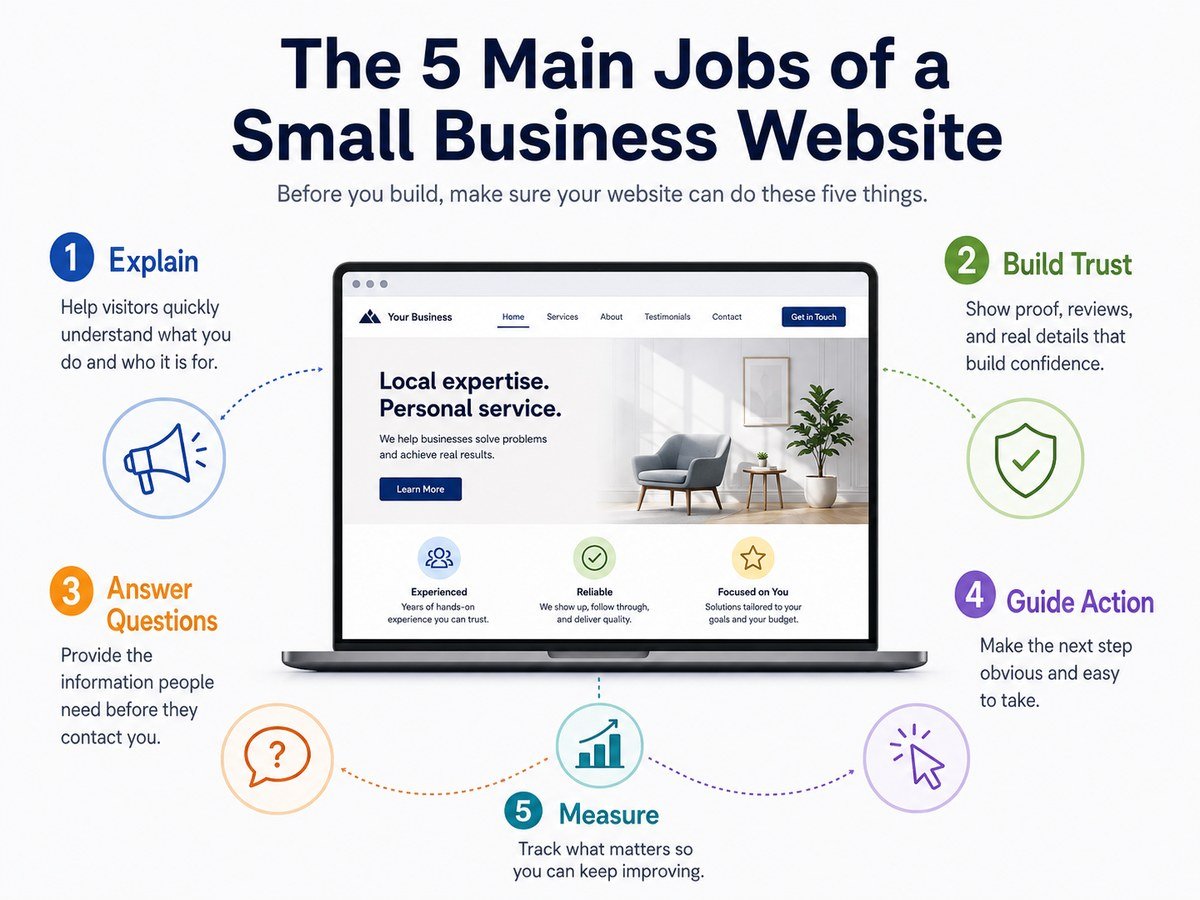
1. Explain What Your Business Does Quickly
The first job of a business website is simple: help visitors understand where they are.
A new visitor should not need to study several paragraphs or click through multiple pages to figure out:
- What your business offers
- Who it is for
- What problem you help solve
- Where you operate, if location matters
Imagine someone arriving on your homepage without knowing anything about your company.
Could they understand the basic purpose of the business within a few moments?
If not, the website has a communication problem.
Clear language usually works better than clever language.
For example, a heading such as:
Accounting and Tax Services for Small Businesses in Austin
immediately communicates more useful information than:
Building a Better Financial Future
The second version may sound polished, but it forces the visitor to guess what the company actually does.
Your website can have personality, but clarity should come first.
2. Help the Right Visitors Know They Are in the Right Place
A website does not need to appeal equally to everyone.
It needs to work especially well for the people most likely to become customers, clients, subscribers, donors, members, or users.
Before building your website, define your primary audience.
Ask:
- Who usually needs what we offer?
- Why do they come looking for it?
- What situation are they in when they visit?
- What are they worried about?
- What information do they need before taking the next step?
- What might make them leave?
For example, a local plumbing company and a business consultant may both need websites, but their visitors behave very differently.
Someone with a leaking pipe may want an emergency phone number immediately.
Someone considering a consultant may spend much more time reviewing expertise, services, case studies, and the working process.
The website should reflect the visitor’s situation.
This is why good website planning starts with people rather than pages.
3. Give the Website One Primary Goal
A website can support several business goals, but it should usually have one main purpose.
Common primary goals include:
- Generate enquiries
- Get customers to call
- Book appointments
- Sell products
- Collect leads
- Get quote requests
- Encourage store visits
- Explain a service
- Get users to start a trial
- Build an email list
- Provide support or information
Choosing a primary goal helps you make better decisions later.
Suppose the main goal is generating quote requests.
That decision affects:
- What appears on the homepage
- Which calls to action are emphasized
- What information visitors need before requesting a quote
- How long forms should be
- Which pages deserve the most attention
- What you should measure after launch
Without a primary goal, websites often become collections of unrelated sections.
Every department, feature, idea, and message gets added because nobody has a clear way to decide what matters most.
A useful test is to complete this sentence:
The most important thing we want a qualified visitor to do is ________.
If you cannot fill in the blank, define that before moving forward.
4. Build Trust
Visitors do not automatically trust a business because it has a website.
The website needs to give them reasons to feel comfortable.
The type of proof you need depends on the business, but it may include:
- Real customer reviews
- Testimonials
- Case studies
- Examples of previous work
- Professional qualifications
- Certifications
- Business history
- Team information
- Clear contact details
- Physical location
- Real photos
- Policies
- Guarantees
- Frequently asked questions
Not every business needs all of these.
The goal is not to cover the website in trust badges. The goal is to reduce reasonable uncertainty.
Think about the questions a cautious customer might ask:
Is this a real business?
Can they actually do what they claim?
Have they helped people like me before?
What happens after I contact them?
Can I reach someone if something goes wrong?
Your website should make those questions easier to answer.
5. Answer the Questions People Need Before Contacting You
Many visitors are not ready to contact a business immediately.
First, they want information.
A useful website answers enough of their questions to help them decide whether taking the next step makes sense.
Depending on your business, visitors may want to know:
- What services or products are available?
- Who is the service designed for?
- Where do you operate?
- What is included?
- How does the process work?
- How long does it normally take?
- What should the customer prepare?
- Are there minimum requirements?
- What happens after an enquiry?
- What makes one option different from another?
You do not need to predict every possible question.
Focus first on questions that regularly affect a buying or enquiry decision.
This information can live on service pages, product pages, FAQ sections, process pages, or educational articles.
The important thing is that visitors should not need to contact you just to understand the basics.
6. Make the Next Step Obvious
Once someone understands the business and is interested, the website should not make them search for what to do next.
That next step might be:
- Contact us
- Request a quote
- Book an appointment
- Call now
- Visit the store
- Buy now
- Start a trial
- View available products
- Send an enquiry
- Download a resource
A common website mistake is offering too many equally important actions at once.
If the top of a page contains buttons for:
Learn More
Contact Us
Read Our Story
View Services
Subscribe
Download
Book Now
visitors must decide which path the website wants them to take.
That creates unnecessary friction.
Secondary actions are fine, but your main action should be easy to recognize.
Before building the site, decide what that action is.
7. Work Well on the Devices Your Customers Actually Use
Website planning should not assume visitors will sit in front of a large desktop monitor.
People may arrive from phones, tablets, laptops, search results, social media links, email messages, map listings, or advertisements.
That affects how the site should work.
On smaller screens, visitors still need to be able to:
- Read the text comfortably
- Understand the navigation
- Tap buttons without difficulty
- Complete important forms
- Find contact information
- View images without broken layouts
- Understand the main message without excessive scrolling
Mobile usability should therefore be part of the original website plan, not something added after the desktop design is finished.
8. Help People Find Important Information
A website is not only a homepage.
Visitors need a clear way to move through it.
Before building individual pages, think about the information people will need and how those pieces relate to each other.
A simple small business website might include:
- Home
- Services or Products
- About
- Contact
Another business may also need:
- Individual service pages
- Locations
- Portfolio or Work
- Case Studies
- FAQs
- Resources
- Blog
- Booking
- Pricing information
- Support
- Customer account pages
More pages do not automatically make a better website.
The goal is to create enough structure to answer visitor needs without making navigation unnecessarily complicated.
This is why planning a sitemap before building pages is useful.
9. Support Search Visibility
If you want people to discover the business through search engines, the website needs enough useful information for both visitors and search systems to understand what each page is about.
That does not mean repeating keywords everywhere.
It means creating clear, focused pages around real topics.
For example, a business offering several distinct services may benefit from giving important services their own pages rather than placing one short sentence about every service on a single page.
Likewise, a business serving specific locations may need useful location information rather than simply listing dozens of city names.
Search visibility should begin with useful content and clear website structure.
SEO cannot compensate for a website that never explains the business properly.
10. Be Easy for the Business to Maintain
Website planning often focuses entirely on launch day.
But the website will continue to exist after launch.
Someone will eventually need to:
- Update text
- Replace images
- Add services
- Change opening hours
- Update team members
- Publish new content
- Fix outdated information
- Review forms
- Update software
- Check that important pages still work
Before deciding how the website should be built, consider who will maintain it.
Ask:
- Who will update the content?
- How comfortable are they with website tools?
- How often will information change?
- Will new pages be added regularly?
- Does the business need an easy visual editor?
- Who will handle technical maintenance?
A website that is theoretically powerful but too difficult for the business to maintain can become outdated surprisingly quickly.
Maintenance requirements should influence the technology and structure you choose.
11. Give You Something Useful to Measure
Once a website is live, you should be able to tell whether it is helping.
The useful measurements depend on the site’s primary goal.
For a lead-generation website, you might care about:
- Enquiries
- Form submissions
- Phone calls
- Appointment bookings
For an online store, you might care about:
- Purchases
- Add-to-cart activity
- Checkout completion
For an educational website, you may care more about:
- Which content visitors read
- Whether they continue to related pages
- Whether useful content brings people back
Do not choose measurements simply because they are easy to count.
For example, increasing page views sounds positive, but thousands of irrelevant visitors may be less valuable than a smaller number of people who actually need what the business offers.
Start with the business goal, then decide which website actions indicate progress toward it.
What You Should Decide Before Building the Website
You do not need a complicated strategy document.
For many small businesses, answering a short set of questions is enough to create a much clearer project.
Write down your answers to these questions:
1. Who is the website mainly for?
Describe your most important type of visitor.
2. What do they need from us?
Think about the problem, service, product, or information that brings them to the site.
3. What is the website’s primary goal?
Choose the single most important outcome.
4. What should visitors do next?
Define the main call to action.
5. What must they understand before taking that action?
List their most important questions.
6. What proof will help them trust us?
Identify reviews, work examples, qualifications, policies, team information, or other relevant evidence.
7. What pages are actually necessary?
Start with visitor needs rather than copying another company’s navigation.
8. Who will maintain the website after launch?
Make sure the planned system is realistic for the people who will use it.
If you can answer these eight questions clearly, many later website decisions become easier.
Common Mistakes to Avoid Before Building
Starting With the Design
Choosing colors and layouts before defining the website’s purpose often leads to attractive pages with weak communication.
Strategy does not need to be complicated, but it should come first.
Copying a Competitor’s Website Structure
Competitor research can be useful.
Copying their structure without knowing why it exists is not.
Their customers, services, marketing strategy, internal resources, and goals may be different from yours.
Trying to Include Everything
Businesses often want to put every possible piece of information on the homepage.
A homepage should guide visitors, not replace the entire website.
Important subjects can have their own pages.
Giving Every Goal Equal Priority
If every button and message is equally important, nothing feels important.
Establish a hierarchy.
Planning Only for Launch
Think about how the website will be updated, expanded, measured, and maintained after it goes live.
A Simple Website Purpose Statement
Before you begin the website project, try writing one sentence using this format:
Our website helps [type of visitor] understand [what we offer or help with] and encourages them to [primary action].
For example:
Our website helps local homeowners understand our plumbing services and encourages them to request an appointment.
Or:
Our website helps small retailers compare our inventory software and encourages qualified businesses to start a trial.
This sentence will not appear on the website.
It is a planning tool.
When someone suggests a new feature, page, section, or piece of content, you can ask whether it helps the website accomplish that purpose.
That simple question can prevent a website project from becoming much more complicated than it needs to be.
Final Thoughts
A small business website should do more than look professional.
It should help visitors quickly understand the business, recognize whether it is relevant to them, find answers, build confidence, and move toward a useful next step.
Before choosing a platform, designing a homepage, or building pages, define those jobs first.
You do not need every detail figured out.
You simply need enough clarity to know:
Who the website is for, what they need, and what you want the website to help them do.
Once those decisions are made, planning the sitemap, homepage, content, design, and technical requirements becomes much easier.
Frequently Asked Questions
What is the main purpose of a small business website?
The purpose depends on the business. It may generate enquiries, sell products, book appointments, provide information, encourage visits, or support existing customers. The important part is choosing a primary goal before designing the site.
How many pages does a small business website need?
There is no universal number. A simple business may need only a few core pages, while a company with several services, locations, products, or resources may need considerably more. Each page should have a useful purpose rather than existing simply to make the website larger.
Should I design the website before writing the content?
You do not necessarily need every sentence finished before design begins, but you should understand the main message, page purpose, information hierarchy, and calls to action first. Designing without knowing what the pages need to communicate often creates unnecessary rework.
What information should I prepare before building a website?
Useful starting material includes your business description, services or products, target customers, contact information, service area, common customer questions, testimonials or other trust signals, images, and the main action you want website visitors to take.
Do small businesses still need websites if they use social media?
Social media can be an important discovery and communication channel, but it serves a different role from a business’s own website. A website gives the business a central place to organize important information, explain its offering in depth, and guide visitors through a deliberate path without depending entirely on the structure of a third-party social platform.
Related reading: choosing your primary website goal, planning a simple website sitemap, and creating a website requirements checklist.