
Small business digital systems can involve dozens of tools without ever becoming a coherent system.
A website may collect enquiries. An online store may take payments. A CRM may store customer information. Staff may manage work in spreadsheets. Marketing tools may send emails. Automation software may move information between apps. AI tools may answer questions or summarize data.
Each tool can be useful on its own.
The real value appears when these systems work together.
Understanding how the main digital systems fit together helps a business avoid duplicate work, disconnected data, unnecessary software subscriptions, and complicated processes that become harder to manage as the company grows.
This guide explains the main parts of a typical small-business digital setup, what each one does, and how they can connect.
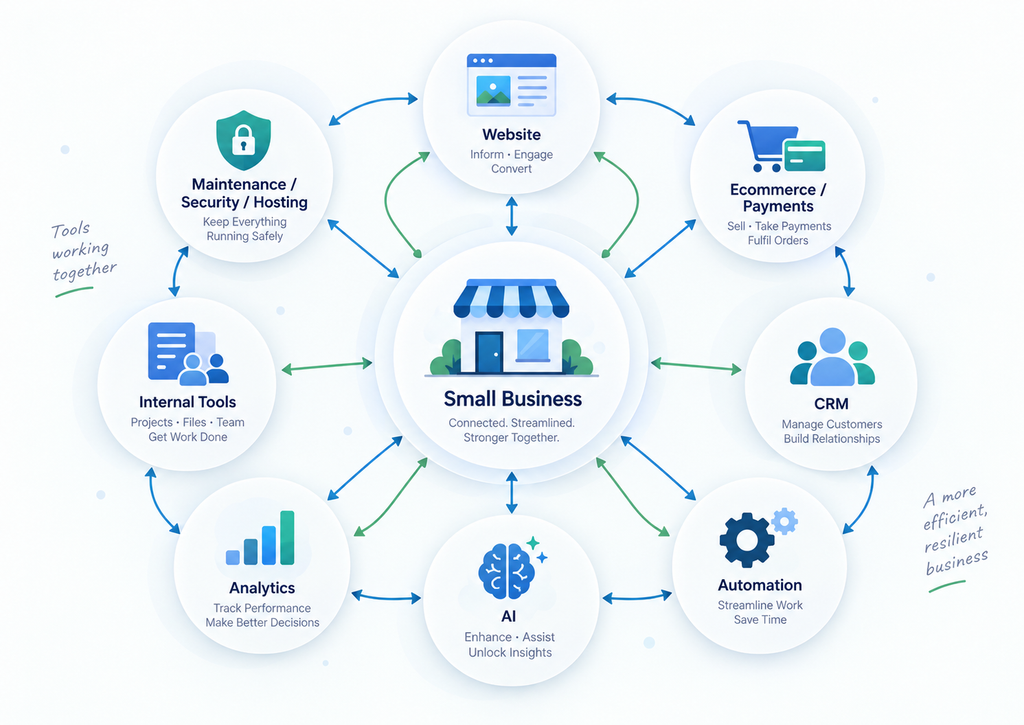
1. Small Business Digital Systems Are More Than a Collection of Apps
A digital system is the combination of tools, data, workflows, and processes a business uses to operate.
It may include:
- A website
- An ecommerce platform
- A customer relationship management system
- Internal business software
- Payment systems
- Email and messaging tools
- Automation platforms
- AI tools
- Analytics
- Hosting
- Security
- Backup and maintenance systems
The important question is not:
How many tools does the business use?
The better question is:
How does information move through the business?
For example, imagine a customer submits an enquiry through a website.
What happens next?
Does the enquiry remain inside the website?
Does someone manually copy it into a spreadsheet?
Does it automatically create a CRM contact?
Does the sales team receive a notification?
Does the customer receive a confirmation email?
Can management later see how many enquiries became customers?
The answers reveal whether the business has a connected system or simply a collection of separate tools.
2. The Website: The Public-Facing Foundation
For many businesses, the website is the first digital system customers interact with.
A website can serve several different purposes:
- Explain what the business does
- Show products or services
- Generate enquiries
- Accept bookings
- Collect quote requests
- Provide customer information
- Sell products
- Support existing customers
- Connect users to other systems
The website is often the visible front end of a much larger digital setup.
A contact form, for example, may look simple to the visitor.
Behind the form, several things can happen:
- The enquiry is stored.
- A notification is sent.
- The customer receives confirmation.
- The contact is added to a CRM.
- A task is created for a staff member.
- The lead source is recorded for analytics.
The website is therefore not always a standalone system.
It is often the entry point into the rest of the business.
3. Ecommerce and Online Payments
For businesses selling products or services online, ecommerce adds another layer.
An ecommerce system normally manages:
- Products
- Prices
- Inventory
- Shopping carts
- Checkout
- Payments
- Customer accounts
- Orders
- Shipping
- Taxes
- Discounts
Platforms such as Shopify and WooCommerce combine many of these functions.
But an online store usually needs to communicate with other systems.
For example:
Online Store → Payment Provider → Order System → Inventory → Email → Accounting
A customer places an order.
The payment provider confirms payment.
Inventory is reduced.
The customer receives an order confirmation.
The fulfilment team receives the order.
Accounting software records the transaction.
Analytics records the sale.
This is a good example of why businesses should think about systems rather than individual pages or apps.
The checkout page is only one small part of the entire process.
4. CRM: Where Customer Relationships Are Managed
CRM stands for Customer Relationship Management.
A CRM helps a business organize information about:
- Leads
- Customers
- Conversations
- Sales opportunities
- Follow-ups
- Deals
- Notes
- Customer history
Without a CRM, customer information often becomes scattered across:
- Email inboxes
- Spreadsheets
- Messaging apps
- Contact forms
- Individual employee notes
That becomes difficult to manage as the number of enquiries increases.
A CRM can become the central customer record.
For example:
Website enquiry → CRM contact → Sales opportunity → Follow-up → Customer
The website captures the lead.
The CRM stores the information.
A salesperson follows up.
The opportunity moves through different stages.
Once the lead becomes a customer, the same information can later connect to invoicing, support, projects, or marketing systems.
Not every small business needs a complex CRM.
But every growing business eventually needs a reliable way to know:
Who is this customer, what have we discussed, and what needs to happen next?
5. Internal Tools and Business Software
Customer-facing systems receive most of the attention, but internal systems can be just as important.
Internal software may manage:
- Projects
- Staff tasks
- Inventory
- Quotes
- Scheduling
- Customer requests
- Documents
- Approvals
- Reporting
- Service delivery
- Operations
Many businesses initially manage these processes using spreadsheets.
There is nothing wrong with spreadsheets when the process is simple.
Problems usually begin when staff repeatedly:
- Copy data between spreadsheets
- Search through long email threads
- Enter the same information into multiple systems
- Forget follow-ups
- Use different versions of the same file
- Depend on one employee who understands the process
At that point, the business may need a more structured internal tool.
This does not always mean building custom software.
A mature project-management platform, CRM, database tool, accounting system, scheduling platform, or industry-specific application may already solve the problem.
Custom software usually makes the most sense when the business has a workflow that is important, repeated frequently, and poorly supported by existing tools.
6. Automation: Connecting Repetitive Work
Automation is the layer that helps systems communicate without requiring a person to manually perform every step.
Consider a simple quote request.
Without automation:
- Customer submits a form.
- Staff receives an email.
- Staff copies the information into a spreadsheet.
- Staff creates a CRM contact.
- Staff creates a task.
- Staff sends a confirmation email.
With automation:
Form submitted → CRM contact created → Task created → Notification sent → Confirmation email sent
The employee only needs to handle the parts that actually require human judgment.
Automation is especially useful for repetitive processes involving:
- Data entry
- Notifications
- Lead routing
- Follow-ups
- Status updates
- File movement
- Reporting
- Customer onboarding
- Appointment reminders
- Order processing
Tools such as Zapier, Make, and n8n can connect many common business applications.
But automation should not be added simply because automation is possible.
A bad process that has been automated is still a bad process.
The process should first be clear and useful.
Then automation can remove unnecessary manual work.
7. AI: Adding Intelligence to Existing Processes
AI is often discussed as though it should replace an entire business system.
In practice, AI is usually more useful when it improves an existing workflow.
Examples include:
- Answering common customer questions
- Summarizing support tickets
- Classifying incoming enquiries
- Extracting information from documents
- Drafting responses
- Searching internal knowledge
- Generating reports
- Identifying patterns in business data
- Helping staff find information faster
Consider customer support.
A traditional workflow might be:
Customer question → Support inbox → Employee reads → Employee searches documentation → Employee replies
An AI-assisted workflow might be:
Customer question → AI checks approved knowledge → Suggested answer → Human review when necessary
The AI does not need to replace the support system.
It becomes another layer inside it.
This distinction matters.
Businesses should normally start by identifying a real process problem, then decide whether AI is the right tool.
Starting with the question:
“Where can we use AI?”
often produces unnecessary projects.
Starting with:
“Where are we wasting time or losing information?”
usually leads to better decisions.
8. Hosting, Security, Backups, and Maintenance
Every website and software system also depends on infrastructure.
Users may never see this layer, but it keeps everything running.
It includes:
- Hosting
- Domains
- SSL certificates
- Databases
- Backups
- Software updates
- Security monitoring
- Performance monitoring
- Error logging
- Recovery procedures
Building a system is only the beginning.
Websites, plugins, frameworks, APIs, operating systems, and external services change over time.
A system that works correctly today can later develop problems because of:
- Software updates
- Plugin conflicts
- API changes
- Expired credentials
- Security vulnerabilities
- Hosting issues
- Increasing traffic
- Database growth
- Configuration mistakes
This is why maintenance should be considered part of the system rather than an optional afterthought. For small businesses, the NIST Cybersecurity Framework 2.0 resources for small businesses are a useful reference for practical security and risk-management basics.
The more important the digital system becomes to the business, the more important monitoring, backups, and recovery become.
9. Analytics and Reporting
A connected system should also help the business understand what is happening.
Analytics may track:
- Website visitors
- Traffic sources
- Enquiries
- Sales
- Conversion rates
- Customer acquisition
- Support volume
- Order values
- Marketing performance
- Operational performance
Individual tools often provide their own reports.
The challenge is connecting those reports to business outcomes.
For example, knowing that a website received 10,000 visits is useful.
Knowing that:
10,000 visits → 300 enquiries → 60 qualified leads → 15 customers
is much more useful.
A well-designed digital setup allows the business to follow information through the entire process instead of measuring isolated numbers.
10. How the Main Systems Connect
A simplified small-business setup may look like this:
Website / Ecommerce Store
↓
Forms / Bookings / Orders
↓
CRM / Customer Database
↓
Internal Tools / Project Management / Operations
↓
Automation
↓
Email / Notifications / Customer Communication
AI can support several parts of this flow:
AI → Customer Support
AI → Internal Knowledge
AI → Data Processing
AI → Workflow Assistance
Analytics observes what happens across the system.
Hosting, security, backups, and maintenance support everything underneath.
The exact architecture will differ from one business to another.
A restaurant, law firm, ecommerce store, software company, construction contractor, and medical clinic will not need the same stack.
The principle remains the same:
Each system should have a clear job, and information should move between systems intentionally.
11. What Should a Small Business Build First?
A common mistake is trying to build everything at once.
Most small businesses should start with the system closest to revenue or operations.
A simple sequence might be:
Stage 1: Establish the customer entry point
This may be:
- A website
- Ecommerce store
- Booking system
- Lead form
Customers need a clear way to discover the business and take action.
Stage 2: Organize incoming information
Once enquiries or orders increase, the business may need:
- CRM
- Order management
- Project management
- Customer database
The goal is to stop important information from becoming scattered.
Stage 3: Improve repetitive workflows
Once the process is stable, identify tasks that happen repeatedly.
Then consider:
- Integrations
- Notifications
- Automated follow-ups
- Data synchronization
- Workflow automation
Stage 4: Add intelligence
Only after useful data and processes exist does AI become especially valuable.
AI works best when it has:
- Reliable information
- Clear boundaries
- Defined tasks
- Existing workflows to support
Trying to add advanced AI to a disorganized process usually creates more complexity rather than less.
12. Avoid Buying Tools Before Designing the Process
Small businesses often accumulate software over time.
One person chooses a CRM.
Another chooses an email platform.
A new employee introduces a project-management tool.
The ecommerce store uses separate apps.
Accounting uses another system.
Eventually the business may be paying for many tools while employees still copy information manually between them.
Before adding another tool, ask:
- What problem are we solving?
- Which system currently owns this information?
- Does an existing tool already solve the problem?
- Does the new tool need to connect with anything else?
- Who will maintain it?
- What happens if we stop using it?
- Is the process complicated because of the tool, or because the process itself is unclear?
The best digital system is not necessarily the one with the most software.
It is the one that supports the business with the least unnecessary complexity.
13. Example: A Connected Service Business
Imagine a small home-services company.
A customer searches online and finds the company website.
The digital flow could look like this:
Google Search
↓
Website
↓
Quote Request Form
↓
CRM
↓
Automatic Customer Confirmation
↓
Staff Notification
↓
Job Scheduling System
↓
Service Completed
↓
Invoice
↓
Review Request
Automation handles the movement of information.
The CRM maintains the customer record.
The scheduling system manages the actual service.
Accounting handles the financial record.
Analytics tracks where the enquiry came from.
An AI assistant might later help staff summarize customer requests or answer common questions.
None of these systems needs to be unusually complicated.
The value comes from the fact that they work together.
14. Start With the Business Process, Not the Technology
Websites, software, automation, and AI are tools.
They should support the way a business needs to operate.
Before deciding what to build, map the real process:
How does someone become aware of the business?
How do they contact or buy from the business?
Where is their information stored?
Who needs to act next?
Which steps are currently manual?
Where do errors or delays happen?
What information does management need to see?
Once those questions are answered, choosing technology becomes much easier.
A small business does not need every digital system available.
It needs the right systems, connected in the right way, at the right stage of growth.
That is the foundation of a practical digital setup that can grow with the business instead of becoming another source of complexity.
Related reading: small business website essentials, custom vs off-the-shelf software, and MVP vs full product planning. For implementation help, see Business Software & Internal Tools.