
Small business website essentials are much simpler than many businesses expect: a clear offer, useful service or product information, trust signals, reliable contact options, mobile usability, and a sound technical foundation. A small business website does not need dozens of pages, complicated animations, or every feature a large company uses.
What it does need is clarity.
A good small business website should quickly answer a few basic questions:
- Who are you?
- What do you offer?
- Who is it for?
- Why should someone trust you?
- What should a visitor do next?
If those questions are easy to answer, the website is already doing much of its job.
The challenge is deciding what belongs on the website, what can wait, and what is unnecessary.
This guide explains the essential pages, content, features, and technical foundations most small business websites actually need.
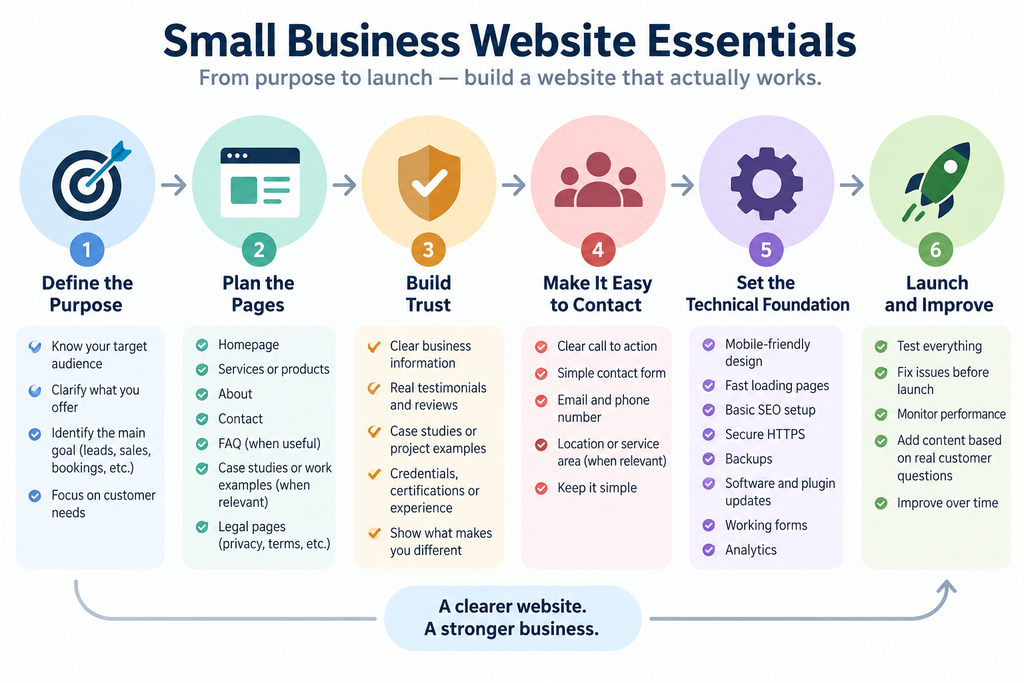
Small Business Website Essentials Start With a Clear Purpose
Before choosing pages, colors, layouts, or software, decide what the website is supposed to accomplish.
Different businesses need different websites.
A local service business may primarily want visitors to:
- Request a quote
- Call or message the business
- Book an appointment
- Check service areas
- Understand available services
A consulting business may want visitors to:
- Understand its expertise
- Review services
- Read useful content
- Submit an inquiry
- Schedule the next step
An online store needs a very different structure:
- Product discovery
- Product pages
- Cart
- Checkout
- Payments
- Shipping information
- Returns information
- Customer support
The right question is therefore not:
“What pages should every website have?”
It is:
“What information does a customer need before taking the next step with this business?”
That question should guide the entire website.
1. A Clear Homepage
The homepage is often the first page a potential customer sees.
Its job is not to explain every detail about the company.
Its job is to help visitors understand the business quickly and move toward the right next step.
A useful homepage normally includes several core elements.
A Clear Opening Message
The top of the page should explain what the business does without forcing visitors to interpret vague marketing language.
For example:
Less clear:
Helping businesses unlock their potential.
This could describe almost any company.
Clearer:
Bookkeeping and payroll support for small businesses in Austin.
The second version immediately tells the visitor:
- What the service is
- Who it is for
- Where the business operates
Clarity is usually more valuable than clever wording.
A Primary Call to Action
The homepage should make the next step obvious.
Depending on the business, this could be:
- Request a Quote
- Book an Appointment
- Contact Us
- Get Started
- View Services
- Shop Products
There does not need to be a different button for every possible action.
One primary action and perhaps one secondary action are usually enough.
A Short Overview of the Main Services
Visitors should be able to understand the main things the business provides without reading the entire website.
For example, a home services company might show:
- Plumbing repair
- Drain cleaning
- Water heater installation
- Emergency service
Each service can then link to a more detailed page if necessary.
Trust Information
Visitors often want reassurance before they contact a business.
Useful trust elements can include:
- Years in business
- Certifications
- Licenses
- Customer testimonials
- Reviews
- Client logos
- Case studies
- Guarantees
- Professional memberships
- Real project examples
Not every business needs all of these.
Only show evidence that is genuine and relevant.
A Final Next Step
The bottom of the homepage should not leave the visitor wondering what to do.
A simple contact section or call to action is usually enough.
2. A Services or Products Section
Most small business websites need a clear explanation of what they actually sell.
A common mistake is describing the company extensively while barely explaining the services.
Customers usually care first about whether the business can solve their problem.
A good services page should answer:
- What is the service?
- Who is it for?
- What problem does it solve?
- What is normally included?
- How does the process work?
- What should the customer do next?
If the company provides several important services, separate pages can make sense.
For example:
/services/
could lead to:
/website-design/
/seo/
/website-maintenance/
Separate pages are particularly useful when services are significantly different or when customers search for them independently.
But businesses should not create dozens of thin service pages just to make the website look larger.
Five useful pages are better than twenty nearly empty ones.
3. An About Page That Builds Trust
The About page is not simply a company biography.
Its real purpose is to reduce uncertainty.
Visitors may want to know:
- Is this a real business?
- Who will I be working with?
- Does this company understand businesses like mine?
- How experienced is the team?
- What makes its approach different?
A useful About page can include:
- A brief company story
- Relevant experience
- Team information
- Working principles
- Industries served
- Location or service area
- Real photos where appropriate
Avoid turning the page into a long history that has little relevance to the customer.
The goal is trust, not autobiography.
4. A Reliable Contact Page
A website that generates interest but makes contacting the business difficult is failing at one of its most basic tasks.
The contact page should be simple.
Depending on the business, it might contain:
- Contact form
- Email address
- Phone number
- WhatsApp or messaging option
- Business address
- Opening hours
- Service area
Do not require unnecessary information.
If someone only needs a simple answer, forcing them to complete a 15-field form can reduce inquiries.
A general contact form might only need:
- Name
- Message
More complex businesses can use a separate project brief or quote request form when detailed information is genuinely useful.
5. Individual Service Pages When They Add Value
A small business does not automatically need one page for every service.
Create separate service pages when they help visitors make a decision.
For example, a company offering:
- Website design
- Online stores
- Website maintenance
would probably benefit from individual pages because each service has a different audience, scope, and buying decision.
A smaller company offering several closely related variations of one service may only need a single strong services page.
The deciding factor should be usefulness, not page count.
6. Frequently Asked Questions
A FAQ section can remove common objections before a visitor contacts the business.
Useful questions might include:
- How long does the process take?
- What information do you need from me?
- Do you work with businesses outside your area?
- What happens after I submit an inquiry?
- Can you work with my existing website?
- Do you provide ongoing support?
FAQs should answer genuine customer questions.
They should not exist simply because every website template has a FAQ section.
7. Proof of Previous Work
For many service businesses, examples are one of the strongest forms of trust.
These might appear as:
- Portfolio
- Case studies
- Before-and-after examples
- Project gallery
- Client results
- Sample work
A case study is especially useful because it explains more than the final appearance.
A simple structure can be:
The Situation
What problem did the customer have?
The Work
What was done?
The Result
What improved?
Businesses without a large portfolio do not need to invent one.
A few real examples are more credible than a large collection of vague claims.
8. Testimonials and Reviews
Testimonials help reduce risk for potential customers.
The strongest testimonials are specific.
Compare:
Great company. Highly recommended.
with:
They rebuilt our booking website and made the process much easier for customers on mobile. We also stopped receiving the form errors we had been dealing with for months.
The second testimonial explains what actually changed.
Whenever possible, provide enough context for the testimonial to feel credible.
9. Mobile-Friendly Design
A website should work properly on phones, tablets, and desktop computers.
This means more than simply shrinking the desktop version.
On mobile devices:
- Text should remain readable
- Buttons should be easy to tap
- Menus should work properly
- Forms should fit the screen
- Images should resize correctly
- Important information should not disappear
- Pages should not require horizontal scrolling
Mobile testing should happen before launch, not after customers start reporting problems.
10. Fast Loading Pages
A beautiful website can still create a poor experience if visitors spend too long waiting for it to load.
Common causes of slow small business websites include:
- Oversized images
- Too many plugins
- Heavy animations
- Poor hosting
- Large video backgrounds
- Unnecessary third-party scripts
- Badly optimized themes or page builders
A business website does not need to chase perfect performance scores at the expense of everything else.
But normal pages should feel fast and responsive.
11. Basic Search Engine Foundations
A website does not need an enormous SEO strategy before launch, but basic search engine foundations should be in place.
At minimum, important pages should have:
- Clear page titles
- Logical headings
- Useful content
- Descriptive URLs
- Internal links
- Appropriate image alt text
- Mobile-friendly layouts
- Crawlable pages
- A sitemap
- Proper indexing settings
For example:
Better URL:
example.com/accounting-services/
Less useful URL:
example.com/page?id=173
SEO should begin with making the site understandable for both people and search engines. Google’s SEO Starter Guide is a useful reference for the basic search-friendly foundations a business site should get right.
12. Local Business Information When Relevant
Local businesses should make location information easy to understand.
This can include:
- City
- Service area
- Address
- Opening hours
- Phone number
- Directions
- Areas served
A plumber serving one metropolitan area does not need to make visitors guess whether their neighborhood is covered.
Likewise, a fully remote company should make that clear so visitors do not assume it only serves customers near its registered address.
13. Secure HTTPS
Modern business websites should use HTTPS.
Visitors should see a secure connection rather than browser warnings.
HTTPS protects information transmitted between the visitor and the website and is now a basic expectation rather than an optional extra.
The site should also be configured so that users are consistently redirected to the secure version.
14. Backups
Websites break.
Updates can fail.
Plugins can conflict.
Files can be deleted.
Servers can experience problems.
A backup system provides a way to recover.
A useful backup process should ideally include:
- Website files
- Database
- Regular automatic backups
- More than one recent restore point
- Storage separate from the live website where practical
A backup is only useful if it can actually be restored.
15. Software and Plugin Updates
A business website should not be treated as something that is launched and then ignored forever.
Platforms, plugins, themes, integrations, and security requirements change.
Regular maintenance may include:
- CMS updates
- Plugin updates
- Theme updates
- Compatibility checks
- Form testing
- Backup checks
- Security checks
- Broken-link checks
- Performance monitoring
This is particularly important for websites built with systems such as WordPress and WooCommerce.
16. Working Forms
Forms are often one of the most important parts of a service business website.
They also fail more often than many business owners realize.
Possible problems include:
- Messages not arriving
- Spam blocking real inquiries
- Confirmation emails failing
- Required fields breaking
- Mobile layout problems
- Integrations disconnecting
Every important form should be tested from beginning to end.
Do not just check whether the button can be clicked.
Submit a real test and confirm the message arrives where it should.
17. Analytics
A business should have at least a basic way to understand how its website is being used.
Useful information can include:
- Number of visitors
- Most visited pages
- Traffic sources
- Geographic regions
- Device types
- Conversions
- Popular landing pages
The purpose is not to watch visitor numbers every day.
It is to understand what is working and where improvements may be needed.
18. Privacy and Legal Information
The exact requirements depend on the business, jurisdiction, data collected, and services used.
Common website documents may include:
- Privacy Policy
- Terms and Conditions
- Cookie information
- Refund or return policy
- Shipping policy
- Legal disclosures
An online store will normally need more legal and operational information than a simple brochure website.
Businesses operating across different countries may also need to consider multiple privacy and consumer-protection requirements.
Legal pages should reflect the actual business rather than being copied blindly from another website.
19. A Simple Navigation Structure
Small business websites often become harder to use because too many items are placed in the main menu.
A navigation menu might only need:
- Home
- Services
- About
- Work or Case Studies
- Contact
Some businesses will need more.
Others will need less.
The navigation should reflect the customer’s journey rather than the company’s internal structure.
If users need several seconds just to decide which menu item contains the information they want, the structure is probably too complicated.
20. Clear Calls to Action Throughout the Website
Visitors should not have to return to the homepage every time they want to contact the business.
Relevant calls to action can appear naturally throughout the website.
For example:
After a service explanation:
Discuss Your Project
After a case study:
Have a Similar Project?
At the end of an FAQ:
Contact Us
The goal is not to place a sales button after every paragraph.
The goal is to make the next step available when someone is ready.
What a Small Business Website Usually Does Not Need
Businesses often spend money and time on features that do not solve an actual customer problem.
These can include:
Complicated Animations
Animation can improve a design when used carefully.
But elaborate effects should not make the website slower or harder to use.
Dozens of Pages at Launch
A small website with complete, useful pages is often better than a large website filled with thin content.
More pages can always be added later.
Every Social Media Feed Embedded on the Website
Social links can be useful.
Embedding large feeds from several platforms can add clutter and additional scripts without providing much value.
A Customer Account System Without a Reason
If customers do not need accounts, do not add them simply because the feature exists.
Accounts create additional development, support, privacy, and security responsibilities.
A Mobile App
Many small businesses do not need an app.
A responsive website may already solve the problem.
Build an app when there is a clear recurring use case that a website cannot serve well.
Advanced AI Features Just Because AI Is Popular
AI can be useful for customer support, search, document processing, automation, recommendations, and other workflows.
But adding an AI chatbot to a website does not automatically improve the business.
Start with the customer problem.
Then decide whether AI is the right solution.
How Many Pages Does a Small Business Website Need?
There is no correct universal number.
A very small service business might work perfectly with:
- Home
- Services
- About
- Contact
- Privacy Policy
Another business may need:
- Home
- Individual service pages
- Industries
- Case studies
- About
- FAQ
- Resources
- Contact
- Legal pages
An ecommerce website may contain hundreds or thousands of product and category pages.
Page count should follow the amount of useful information customers actually need.
A Simple Website Planning Framework
Before building the website, create a short list of customer questions.
For example:
Question 1: What does this company do?
Answer it on the homepage.
Question 2: Can they solve my specific problem?
Answer it on service pages.
Question 3: Can I trust them?
Answer it through the About page, reviews, case studies, credentials, and clear business information.
Question 4: How does the process work?
Explain it on service pages, a process section, or FAQ.
Question 5: How do I start?
Provide a clear call to action and simple contact process.
This framework prevents the website from becoming a collection of sections that look good but do not help customers make decisions.
Build the First Version Around Real Needs
A website does not have to contain every possible feature on day one.
In many cases, the better approach is:
Phase 1: Essential Website
Build the pages and functions necessary for customers to understand the business and make contact.
Phase 2: Improve Based on Real Behavior
Add content, integrations, automation, case studies, FAQs, or new services based on actual customer questions and website data.
Phase 3: Expand When There Is a Clear Business Case
More advanced functionality can be introduced when the business genuinely needs it.
This approach is usually easier to maintain and reduces the chance of paying for features that customers never use.
Before Launch: A Practical Checklist
Before publishing a small business website, check the basics.
Content
- Business offer is immediately understandable
- Important services are explained
- Contact information is correct
- No placeholder text remains
- Spelling and grammar have been reviewed
Navigation
- Every menu link works
- Important pages are easy to find
- Logo returns to the homepage
- Mobile menu works
Forms
- Every form can be submitted
- Notifications actually arrive
- Confirmation messages work
- Mobile forms are usable
Mobile
- Pages fit smaller screens
- Buttons are easy to tap
- Text is readable
- Images resize correctly
- Nothing important overlaps
Technical
- HTTPS works
- Backups are configured
- Software is updated
- Pages load properly
- Broken links have been checked
Search
- Page titles are written
- Headings make sense
- Search indexing is enabled
- Sitemap is available
- Important pages are crawlable
Trust
- Business identity is clear
- Contact details are visible
- Reviews or examples are genuine
- Policies match the actual business
The Bottom Line
A small business website does not need to be complicated.
It needs to help the right visitor understand the business, trust it, and take the next step.
For most small businesses, the essentials are straightforward:
- A clear homepage
- Useful service or product information
- An About page
- A reliable contact process
- Trust signals
- Mobile-friendly design
- Fast loading
- Basic SEO
- Security and backups
- Regular maintenance
- Clear next steps
Everything else should be added because it solves a real business or customer problem.
The best website is not the one with the most pages, plugins, animations, or features.
It is the one that makes it easy for a potential customer to understand:
“This business can help me, I trust them, and I know what to do next.”
Related reading: what belongs on a small business homepage, creating a website requirements checklist, and planning a business website from start to launch.