
Professional business website cost varies widely, from a few hundred dollars to tens of thousands of dollars.
That range sounds unhelpfully large until you understand what actually changes the price.
A five-page brochure website for a local service business is not the same project as an online store with hundreds of products. A website built from an existing design system is not the same as one requiring custom branding, integrations, advanced forms, customer accounts, or multilingual content.
The right question is therefore not simply:
“How much does a website cost?”
A better question is:
“What kind of website does my business actually need, and what should that level of website reasonably cost?”
This guide explains the main website price ranges, what drives the cost, which expenses are essential, and how to compare quotes without paying for unnecessary complexity.
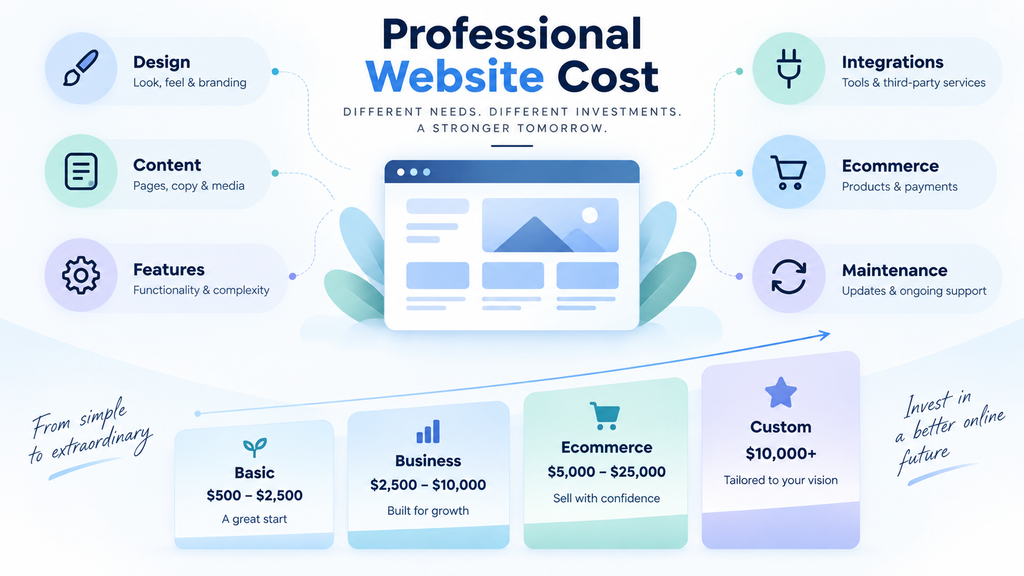
Typical Professional Business Website Cost Ranges
There is no universal price for a professional website, but most projects fall into a few broad categories.
| Website Type | Typical Cost Range | Best For |
|---|---|---|
| Very basic template-based website | $500–$2,000 | Small businesses with simple information needs |
| Professional small-business website | $2,000–$8,000 | Established businesses needing a polished online presence |
| More advanced business website | $5,000–$15,000+ | Businesses needing custom layouts, integrations, advanced forms, or more content |
| Ecommerce website | $3,000–$20,000+ | Businesses selling products or services online |
| Complex custom website or portal | $10,000–$50,000+ | Memberships, customer portals, complex workflows, or custom functionality |
| Custom web application | $20,000–$100,000+ | Software products, SaaS platforms, marketplaces, dashboards, and business systems |
These are broad market ranges rather than fixed prices. Current Clutch web development pricing data also shows that project cost and hourly rates vary substantially by scope, technology, and provider.
A website may fall below or above them depending on the scope, location of the development team, platform, design requirements, integrations, content, and technical complexity.
It is also important to separate a normal business website from custom software.
A website that explains your services, displays case studies, collects enquiries, and publishes articles is still primarily a website.
Once the project starts requiring complex user accounts, business logic, dashboards, workflow automation, subscriptions, role-based permissions, or large databases, the project begins moving into web application territory.
That difference has a major effect on cost.
What Actually Determines the Cost of a Website?
Website pricing is usually driven by scope rather than by one single factor.
Here are the biggest cost drivers.
1. Number and Complexity of Pages
More pages usually mean more work, but page count alone does not tell the whole story.
Ten simple service pages created from the same layout may require less work than three highly customized pages containing:
- interactive calculators
- complex forms
- pricing configurators
- animations
- product filters
- booking systems
- comparison tables
- custom data
- third-party integrations
A good website quote should therefore consider both the number of pages and the complexity of those pages.
2. Template-Based vs. Custom Design
Using an established theme, design system, or page-building framework can significantly reduce development time.
This is not automatically a bad thing.
For many small and medium-sized businesses, starting from a proven framework is more efficient than designing every element from scratch.
Custom design becomes more valuable when a business needs:
- a distinctive visual identity
- unusual layouts
- custom interactions
- strict brand guidelines
- a highly differentiated customer experience
The more original design work required, the more time must be spent on wireframes, revisions, visual design, responsive behavior, and implementation.
That increases the project cost.
3. Content Creation
A website cannot be completed with design and code alone.
Someone must provide or create:
- page copy
- service descriptions
- product descriptions
- headlines
- calls to action
- company information
- photographs
- illustrations
- videos
- case studies
- FAQs
Some website projects assume the client will provide all final content.
Others include copywriting, editing, image sourcing, or content organization.
This can create a large difference between two quotes that initially appear to cover the same website.
Always check whether content creation is included.
4. Ecommerce Functionality
Selling online adds additional layers of complexity.
An ecommerce website may require:
- product pages
- product variations
- inventory management
- shopping cart
- checkout
- payment gateways
- shipping rules
- tax configuration
- discount codes
- customer accounts
- order emails
- refunds
- product filters
- search
- analytics
- integration with accounting or fulfilment systems
A store selling ten simple products is very different from a store containing thousands of products, multiple warehouses, international shipping, customer-specific pricing, or complex product options.
That is why ecommerce pricing varies so widely.
5. Third-Party Integrations
Many business websites need to communicate with other systems.
Examples include:
- CRM platforms
- email marketing tools
- booking systems
- payment processors
- accounting software
- live chat tools
- customer support systems
- inventory platforms
- shipping providers
- membership systems
- analytics platforms
- automation tools
Some integrations take only a few minutes to configure.
Others require custom API work, authentication, field mapping, testing, and ongoing maintenance.
If integrations are important to the project, they should be clearly identified before development begins.
6. Forms and Business Workflows
A basic contact form is inexpensive.
A form that changes dynamically based on user answers, calculates prices, uploads files, creates CRM records, sends different notifications, accepts payment, and triggers an automated workflow is much more involved.
Businesses often underestimate how much functionality can exist behind a form.
Before comparing quotes, ask exactly what happens after a visitor clicks Submit.
7. Mobile and Responsive Design
A professional website should work properly on desktop, tablet, and mobile devices.
Responsive design is now a basic requirement rather than an optional extra.
However, complicated layouts can require substantial additional work to behave correctly across different screen sizes.
A design that looks excellent on a large desktop screen may need completely different spacing, navigation, content order, or interactions on a phone.
Good responsive implementation should therefore be included in the project scope.
8. SEO Setup
There is an important distinction between technical SEO setup and ongoing SEO services.
A professional website project may include basic technical work such as:
- clean page structure
- editable page titles
- meta descriptions
- heading hierarchy
- search-friendly URLs
- XML sitemap
- image optimization
- mobile compatibility
- redirects
- basic schema markup
- analytics setup
That does not mean the website will automatically rank at the top of Google.
Ongoing keyword research, content production, digital PR, link acquisition, and competitive SEO campaigns are usually separate services.
If someone promises guaranteed rankings simply because they are building the website, be cautious.
9. Performance and Security
A cheap website can become expensive later if it is slow, unstable, difficult to update, or vulnerable to security problems.
Professional development should consider:
- caching
- image optimization
- database performance
- software updates
- backups
- SSL
- spam protection
- access control
- plugin quality
- dependency management
- server configuration
The amount of work required depends heavily on the platform and project complexity.
10. Revisions and Project Management
Every website project involves communication.
Someone needs to:
- collect requirements
- organize content
- answer questions
- review feedback
- manage revisions
- test the website
- coordinate launch
A quote that includes several structured revision rounds may cost more than one that provides almost no revision support.
The higher price is not necessarily caused by better coding. It may simply include more project management and client support.
Why Website Quotes Can Be So Different
Imagine three companies quoting for the same “business website.”
One quote is $1,000.
Another is $5,000.
Another is $15,000.
It is tempting to assume that one company is cheap and another is expensive.
But they may not actually be selling the same thing.
The $1,000 quote might include:
- a prebuilt template
- five pages
- client-provided content
- minimal customization
- one contact form
- limited revisions
The $5,000 quote might include:
- customized layouts
- content structure
- responsive optimization
- analytics
- SEO setup
- several forms
- performance work
- more revisions
The $15,000 quote might include:
- full brand strategy
- custom UX design
- professional copywriting
- original photography
- advanced integrations
- custom development
- extensive testing
- ongoing consulting
Looking only at the final price makes comparison almost impossible.
The scope matters more than the number.
What Should Be Included in a Professional Website Quote?
Before accepting a proposal, check whether it clearly explains what you are buying.
At minimum, a good quote should clarify:
Pages and Content
Which pages are included?
Who supplies the text and images?
Are additional pages charged separately?
Design
Is the site based on an existing template, customized template, or completely custom design?
How many design revisions are included?
Functionality
Which forms, integrations, ecommerce features, booking tools, customer accounts, or other functions are included?
Mobile Support
Will the website be tested on desktop, tablet, and mobile?
SEO Basics
Are page titles, metadata, sitemap configuration, redirects, and search-engine accessibility included?
Performance
Will images, caching, code, and hosting configuration be optimized?
Security
Are backups, updates, SSL, spam protection, and security configuration included?
Launch
Does the price include domain connection, DNS configuration, migration, deployment, and final testing?
Ownership
Will you own the website, content, domain, and necessary accounts after the project is completed?
Ongoing Costs
What must be paid every month or every year after launch?
Knowing these details makes website quotes much easier to compare.
Website Costs That Continue After Launch
The initial build is not the only expense.
Most websites have ongoing costs.
Domain Name
A standard domain usually costs roughly $10–$30 per year, although premium domains can cost much more.
Your business should ideally control its own domain account.
Hosting
Basic websites may only need inexpensive hosting.
Larger ecommerce sites, high-traffic websites, or resource-intensive applications may require more powerful hosting.
Typical hosting costs can range from a few dollars per month to hundreds or even thousands for large systems.
The cheapest hosting is not always the best value if poor performance causes downtime or slow loading.
Premium Software and Plugins
Platforms such as WordPress often use premium themes, plugins, security tools, form systems, backup services, or other licensed software.
These may require annual renewals.
Before launch, determine:
- which licenses are required
- who owns them
- who pays for renewals
- what happens if a subscription expires
Maintenance
Websites need maintenance.
That can include:
- software updates
- backups
- security monitoring
- uptime monitoring
- bug fixes
- small content changes
- compatibility testing
- performance checks
Some businesses handle this internally.
Others pay a developer or maintenance provider.
Maintenance is particularly important for WordPress, ecommerce, and websites that depend on multiple plugins or integrations.
Should You Use a Freelancer, Agency, or DIY Website Builder?
Each approach has advantages.
DIY Website Builder
Best for very small budgets and simple websites.
Advantages:
- inexpensive
- fast to start
- full control
Disadvantages:
- you must do the work yourself
- design quality varies
- technical limitations may appear later
- business owners can spend significant time learning the platform
DIY can make sense when the website is extremely simple and your time is not the main constraint.
Freelancer
A good freelancer can provide excellent value for small and medium-sized projects.
Advantages:
- lower overhead
- direct communication
- flexible
- often cost-effective
Possible disadvantages:
- availability depends on one person
- skills may be concentrated in certain areas
- larger projects can exceed individual capacity
The quality difference between freelancers can be enormous, so evaluate actual work rather than choosing solely by price.
Agency
Agencies are often better suited to larger or multidisciplinary projects.
Advantages can include access to:
- designers
- developers
- copywriters
- SEO specialists
- project managers
- marketers
The trade-off is higher overhead and therefore usually higher pricing.
Not every small-business website needs a large agency.
When Is a Cheap Website Actually Expensive?
The cheapest proposal can become the most expensive option if the website must later be rebuilt.
Common warning signs include:
- no clear scope
- unclear ownership
- poor mobile design
- excessive plugins
- slow performance
- no backup system
- no security plan
- pirated themes or plugins
- no staging environment
- no testing
- vendor lock-in
- no documentation
- no plan for future changes
The cost of fixing a badly structured website can exceed the cost of building it correctly in the first place.
When Is an Expensive Website Unnecessary?
The opposite problem also exists.
Small businesses sometimes pay for complexity they do not need.
A local service business may not require:
- a completely custom CMS
- a custom frontend framework
- an expensive headless architecture
- elaborate animations
- dozens of integrations
- enterprise infrastructure
- custom software for functionality already available through mature tools
Whenever possible, established platforms and proven components should be considered before custom development.
A more expensive technical solution is not automatically a better business solution.
How to Set a Realistic Website Budget
Instead of starting with an arbitrary number, work backward from business requirements.
Ask:
- What must the website accomplish?
- What pages are actually necessary?
- What actions should visitors take?
- What functionality is essential at launch?
- What can be added later?
- Which existing tools can solve the problem without custom development?
- How much revenue or operational value could the website reasonably create?
Then divide requirements into three categories:
Essential
The website cannot launch without these features.
Useful
These features improve the website but are not required immediately.
Future
These can wait until the website is generating traffic, leads, or revenue.
This approach prevents the first version of a website from becoming unnecessarily expensive.
Questions to Ask Before Hiring Someone to Build Your Website
Before choosing a developer or agency, ask:
- What platform will the website use?
- Why is that platform appropriate for this project?
- Will I be able to edit normal content myself?
- Who owns the domain, hosting, website, and accounts?
- Are premium licenses included?
- What happens after launch?
- How are revisions handled?
- What is not included in the price?
- Are integrations included?
- Is mobile testing included?
- Are backups configured?
- Is basic technical SEO included?
- What happens if the project scope changes?
- Can the website be moved to another provider later?
Clear answers are often more valuable than a polished sales presentation.
How to Compare Website Quotes Properly
Do not compare proposals based only on the final total.
Create a simple comparison table.
| Area | Provider A | Provider B | Provider C |
|---|---|---|---|
| Pages | |||
| Custom design | |||
| Content included | |||
| Ecommerce | |||
| Forms | |||
| Integrations | |||
| Mobile optimization | |||
| SEO setup | |||
| Performance optimization | |||
| Security | |||
| Revisions | |||
| Hosting | |||
| Maintenance | |||
| Ownership | |||
| Ongoing costs |
Once the scope is visible, the price difference usually becomes much easier to understand.
The Bottom Line
A professional business website does not have one standard price.
The cost depends on what the website needs to do, how much customization is required, how much content must be created, which systems must be integrated, and how much support is included.
For many small businesses, the best website is not the cheapest option and not the most expensive option.
It is the simplest solution that reliably achieves the business goal.
Before paying for custom functionality, check whether a mature platform, plugin, integration, or existing system can already solve the problem.
Before accepting the cheapest quote, make sure the essentials have not simply been removed from the scope.
And before approving an expensive proposal, make sure every major cost can be connected to a real business requirement.
A good website budget is not about spending as little as possible.
It is about paying for the parts that matter and avoiding the parts that do not.
Related reading: small business website costs, setting a realistic website scope, and creating a website requirements checklist.
If you are planning a new company site and want a project-specific scope, review SiteLumo’s Business Websites service or request a quote.