
Business website planning is much easier when the important decisions are made before development begins.
A common mistake is to start with colors, templates, or homepage design before deciding what the website actually needs to accomplish. That often leads to unnecessary pages, confusing navigation, missing content, and expensive changes later.
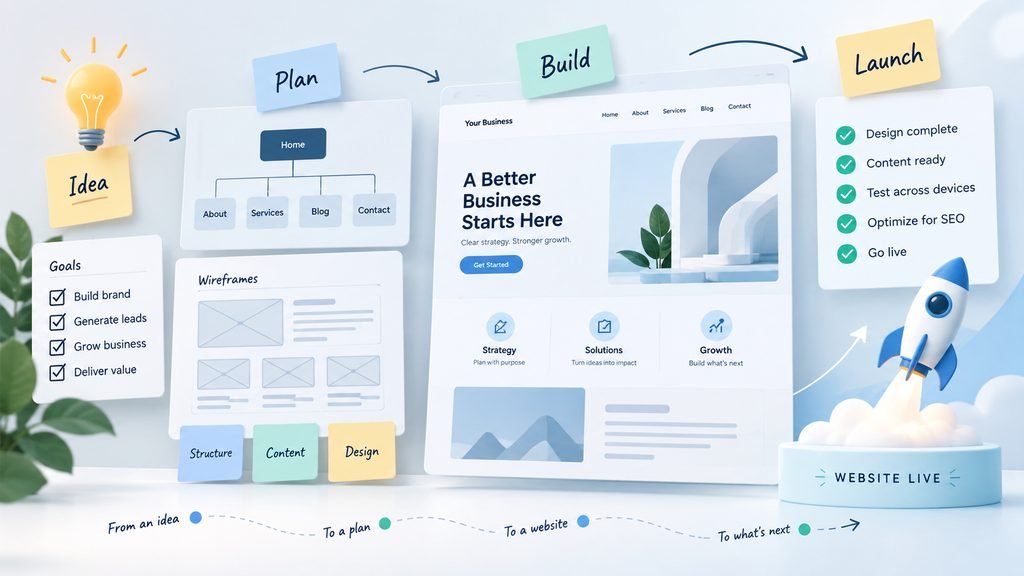
A better process is to plan the website in stages.
This guide walks through the complete process, from defining the purpose of the site to testing and launching it.
1. Define the Main Goal of the Website
Every business website should have a primary purpose.
That purpose may be to:
- generate enquiries
- sell products
- book appointments
- explain services
- attract local customers
- collect leads
- provide customer support
- allow users to create accounts
- showcase previous work
- provide information about a company
A website can support several goals, but one or two should usually be more important than the others.
For example, a plumbing company may primarily want visitors to request a quote.
A consulting business may want visitors to book a consultation.
An online store may want visitors to find products and complete a purchase.
A software company may want visitors to understand the product and start a trial.
Knowing the main goal makes later decisions much easier.
2. Identify the People Who Will Use the Website
The next step is understanding the website’s audience.
Ask questions such as:
- Who are the typical visitors?
- What problem are they trying to solve?
- What information do they need before taking action?
- Are they likely to visit from mobile or desktop?
- Are they comparing several providers?
- What questions might stop them from contacting the business?
- What action should they take after reading a page?
The website should be organized around the visitor’s needs rather than the internal structure of the company.
For example, a visitor usually cares more about:
“Can this company solve my problem?”
than:
“How is this company internally organized?”
That difference matters when planning navigation and page content.
3. Decide What the Website Actually Needs
Before creating pages, list the functionality the website requires.
A simple business website may only need:
- service pages
- contact forms
- maps
- testimonials
- project galleries
- basic analytics
A more advanced website may require:
- customer accounts
- online payments
- appointment booking
- product catalogs
- subscriptions
- dashboards
- file uploads
- multilingual content
- CRM integrations
- email automation
- live chat
- API integrations
Separate these into three groups:
Essential
Features required for the website to perform its main job.
Useful
Features that improve the website but are not necessary for launch.
Future
Features that may be added later.
This prevents the first version of the website from becoming unnecessarily complicated.
4. Create the Website Structure
The website structure defines how pages are organized.
A typical small business website might include:
- Home
- Services
- Individual service pages
- About
- Projects or Portfolio
- FAQ
- Blog or Knowledge Base
- Contact
- Privacy Policy
- Terms and Conditions
An ecommerce website will usually add pages such as:
- Shop
- Product categories
- Product pages
- Cart
- Checkout
- Account
- Shipping information
- Returns information
The exact number of pages is less important than whether each page serves a clear purpose.
Do not create pages simply because other websites have them.
5. Build a Simple Sitemap
A sitemap is a visual or written representation of the website hierarchy.
For example:
Home
→ Services
→ Website Development
→ Website Maintenance
→ Ecommerce Development
→ About
→ Knowledge
→ Contact
A sitemap helps reveal structural problems before development begins.
Look for issues such as:
- too many top-level navigation items
- important pages buried several levels deep
- duplicate pages
- unclear category names
- pages with no obvious purpose
Most visitors should be able to reach important information in only a few clicks.
6. Plan the Navigation
Navigation should be predictable.
Visitors should not have to learn how the website works.
A primary navigation menu usually contains the pages that are most important for understanding the business.
Secondary links can be placed in the footer.
For example, the header might contain:
- Services
- Work
- About
- Knowledge
- Contact
While the footer might also contain:
- Privacy Policy
- Terms
- Support information
- Social links
- Additional service pages
Avoid putting every page in the main menu.
Too many choices can make navigation harder rather than easier.
7. Define the Goal of Every Page
Every important page should have a reason to exist.
Before writing content, define:
Page purpose
What should the visitor learn?
Primary visitor
Who is the page intended for?
Primary action
What should the visitor do next?
For example:
Service Page
Purpose: Explain one service.
Visitor: Someone evaluating whether the service fits their needs.
Action: Contact the business or continue learning.
About Page
Purpose: Build trust and explain the company.
Visitor: Someone deciding whether the business is credible.
Action: Explore services or make contact.
Contact Page
Purpose: Make communication easy.
Visitor: Someone ready to ask a question.
Action: Submit a form, send an email, or use another available contact method.
Pages become much easier to design when their purpose is clear.
8. Plan the Content Before Designing the Pages
Content and design should not be treated as completely separate tasks.
A design cannot properly support content that does not yet exist.
Before finalizing layouts, prepare at least a rough version of:
- headings
- service descriptions
- company information
- calls to action
- FAQs
- testimonials
- product information
- contact details
Placeholder text is useful during early prototyping, but designing an entire website around placeholder content often creates problems later.
Real content may require different spacing, sections, or page structures.
9. Decide Which Platform Fits the Project
The platform should be selected based on requirements, not popularity.
Different projects may be better suited to different systems.
For example:
WordPress
Commonly used for:
- business websites
- blogs
- content-heavy sites
- service companies
- WooCommerce stores
Shopify
Commonly used for:
- ecommerce
- product catalogs
- inventory-driven stores
- businesses that want a managed commerce platform
Custom Web Applications
More appropriate when the website requires:
- complex user accounts
- custom workflows
- internal business logic
- specialized dashboards
- unique integrations
- functionality that standard CMS platforms cannot easily provide
Using a mature platform where possible usually reduces development time and long-term maintenance.
Custom development should be reserved for requirements that genuinely need it.
10. Plan the Website’s Visual Direction
Once the content and structure are understood, the visual design becomes easier.
Define things such as:
- overall style
- typography
- brand colors
- imagery
- button styles
- card styles
- spacing
- iconography
It is often useful to collect a few reference websites.
The goal is not to copy them.
Instead, identify specific characteristics such as:
- generous whitespace
- large typography
- minimal navigation
- editorial layouts
- bold imagery
- soft colors
- compact cards
This gives the designer a much clearer direction than simply saying:
“Make it modern.”
11. Design for Mobile From the Beginning
Mobile design should not be treated as a smaller desktop version.
Important things to check include:
- readable text
- comfortable button sizes
- simple navigation
- form usability
- spacing
- image scaling
- horizontal overflow
- sticky elements
- tables
- menus
A layout that looks excellent on a large monitor may become difficult to use on a phone.
Responsive behavior should therefore be considered during design, not added at the end.
12. Prepare the Technical Foundation
Before development begins, several technical decisions may need to be made.
These can include:
- domain name
- hosting
- SSL
- CMS or framework
- database
- email delivery
- backups
- staging environment
- analytics
- security tools
- caching
- CDN
- third-party integrations
For larger projects, it is useful to document these decisions.
This makes future maintenance much easier.
13. Build the Website in Stages
Large websites should not be built as one enormous task.
A typical sequence might be:
- Technical setup
- Global styles
- Header and navigation
- Footer
- Homepage
- Core service pages
- Secondary pages
- Forms
- Integrations
- Responsive adjustments
- Performance optimization
- Testing
This makes problems easier to identify and reduces the chance that one mistake spreads across the entire website.
14. Test the Website Before Launch
A website should never be considered finished simply because the pages load.
Testing should include both functionality and visual quality.
Test Every Important Page
Check:
- headings
- text
- images
- links
- buttons
- navigation
- forms
Test Different Screen Sizes
At minimum, check:
- desktop
- tablet
- mobile
Test Forms
Verify:
- required fields
- validation
- submission
- confirmation messages
- notification emails
- failure states
Check Links
Look for:
- broken internal links
- incorrect external links
- old staging URLs
- missing pages
Check Performance
Large images, excessive plugins, unnecessary scripts, and poor hosting configurations can significantly slow down a website.
Check Browser Errors
Developer console errors can reveal problems that are not immediately visible on the page.
15. Prepare for Launch
Before switching the website to its live domain, create a launch checklist.
Common launch tasks include:
- create a backup
- confirm domain configuration
- enable SSL
- remove staging restrictions
- verify contact forms
- configure analytics
- check page titles
- check meta descriptions
- check favicon
- verify responsive layouts
- confirm robots settings
- submit sitemap
- check redirects
- remove placeholder content
- test important user journeys
The launch should be treated as a controlled process rather than simply pressing a publish button.
16. Test Again After Launch
Some problems only appear in the production environment.
Immediately after launch, repeat the most important checks.
Test:
- homepage
- navigation
- forms
- checkout if applicable
- account functionality
- important links
- mobile layouts
- email delivery
- redirects
- SSL
- analytics
Also verify that search engines are allowed to crawl the website if that is intended, and use Google Search Console to monitor indexing and search visibility after launch.
17. Plan for Ongoing Maintenance
Launching the website is not the end of the project.
Websites require ongoing attention.
Depending on the platform, this may include:
- software updates
- plugin updates
- backups
- security monitoring
- performance checks
- broken-link checks
- content updates
- form testing
- compatibility testing
- analytics review
A website that is ignored for several years will usually accumulate technical and content problems.
A Simple Business Website Planning Checklist
Before development starts, make sure you can answer these questions:
Business
- What is the website supposed to accomplish?
- Who is the target audience?
- What is the primary conversion?
Structure
- What pages are required?
- How will they be organized?
- What belongs in the main navigation?
Content
- Is the important content ready?
- Are services clearly explained?
- Are calls to action defined?
Functionality
- What features are essential?
- Which features can wait?
- What integrations are required?
Technology
- Which platform fits the requirements?
- Where will the website be hosted?
- How will backups and security work?
Design
- What visual direction should the website follow?
- Are desktop, tablet, and mobile layouts considered?
Launch
- Have forms, links, navigation, and responsive layouts been tested?
- Are analytics, SEO basics, redirects, backups, and security configured?
Final Thoughts
A successful business website usually starts with planning rather than design.
When the website’s goals, users, content, structure, functionality, and technical requirements are clear before development begins, the project becomes easier to build and easier to maintain.
The most important principle is simple:
Decide what the website needs to accomplish first. Then choose the structure, technology, and design that support that goal.
Related reading: choosing your primary website goal, planning a simple website sitemap, and creating a website requirements checklist.
If you are ready to move from planning to implementation, review SiteLumo’s Business Websites service or request a quote.