
Custom software development cost can range from a few thousand dollars for a narrowly scoped tool to hundreds of thousands of dollars for a complex business platform.
That wide range is not a pricing problem. It reflects the fact that “custom software” can mean very different things.
A business might need:
- A simple internal dashboard
- A customer portal
- A booking system
- A workflow automation tool
- A mobile app
- A custom CRM
- A SaaS product
- An e-commerce backend
- A marketplace
- An AI-enabled application
- A multi-role enterprise platform
Each of those projects has a different combination of design, development, integrations, data, security, testing, infrastructure, and ongoing support.
That is why the better question is not simply:
“How much does software development cost?”
It is:
“What does this software need to do, who will use it, what systems must it connect to, and how reliable does it need to be?”
Once those questions are clear, the budget becomes much easier to understand.
This guide breaks down the main cost ranges, the factors that influence pricing, common pricing models, and how to decide what belongs in the first version of a custom software project.
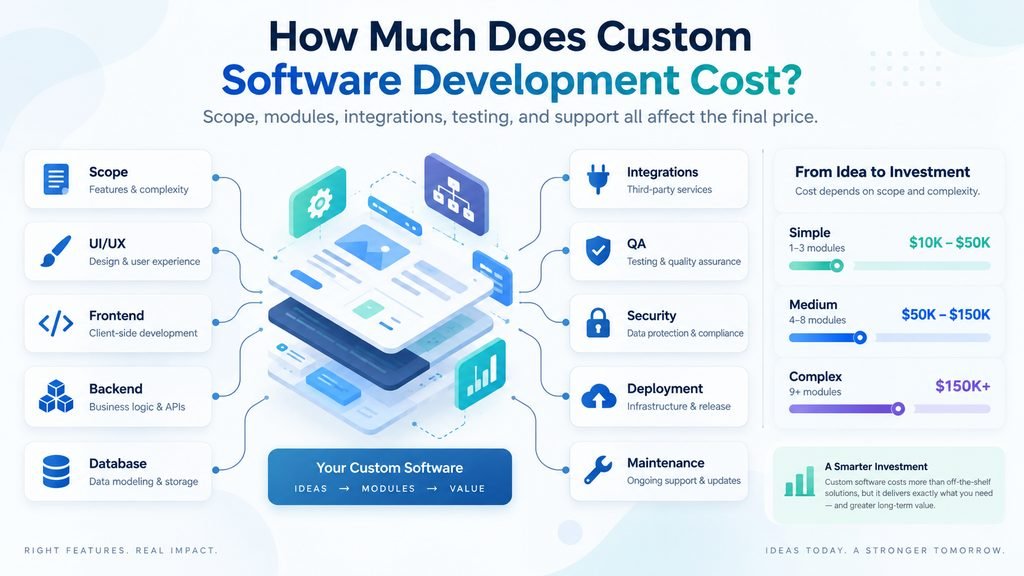
What Is the Typical Cost of Custom Software Development?
There is no single market price, but recent industry data gives useful benchmarks.
A 2026 GoodFirms survey of more than 100 software companies found that many small-to-medium projects fall between $30,000 and $100,000, while larger projects commonly exceed $100,000, and enterprise builds can go beyond $200,000. The same survey found that a smaller MVP can sometimes remain below $30,000 when scope is tightly controlled.
These figures should be treated as market benchmarks rather than quotations.
A project may cost substantially less or more depending on its scope.
| Project Type | Broad Cost Range | Typical Scope |
|---|---|---|
| Very small custom tool | Under $10,000–$20,000 | Narrow workflow, limited users, simple interface |
| Small MVP | Under $30,000 | Core product workflow, minimal integrations, limited automation |
| Small-to-medium business software | $30,000–$100,000 | Multiple workflows, user roles, integrations, dashboards |
| Large custom platform | $100,000–$200,000+ | Complex workflows, multiple systems, higher security and scale |
| Enterprise software | $200,000+ | Large user base, advanced permissions, integrations, compliance, long-term development |
These ranges overlap because two projects with the same number of screens can have completely different engineering requirements.
A five-screen financial application with complex permissions and transaction logic may cost more than a 40-screen content management system.
The number of pages or screens alone does not determine software cost.
The Biggest Factors That Affect Software Development Cost
1. Project Scope
Scope is the biggest pricing factor.
A project that only needs:
- User login
- One dashboard
- Simple data entry
- Basic reporting
is very different from one requiring:
- Multiple user roles
- Subscriptions
- Payments
- Messaging
- Notifications
- File uploads
- Admin controls
- API integrations
- Analytics
- Audit logs
- Mobile applications
Every feature creates additional work beyond simply building the visible interface.
It may also require:
- Database design
- Permissions
- Error handling
- Testing
- Security
- Backend logic
- API work
- Monitoring
A useful software estimate should therefore be based on functional scope, not merely the number of screens.
2. Number of User Roles
User roles can increase complexity quickly.
Consider a marketplace.
It might have:
- Buyers
- Sellers
- Administrators
- Customer support staff
Each role may see different information and have different permissions.
For example:
A seller may create listings.
A buyer can purchase but cannot edit listings.
Support staff may view orders but cannot change payment details.
Administrators may have access to everything.
That creates permission logic throughout the application.
A simple system with one user type is generally much easier to build than a multi-role platform.
3. Authentication and Account Management
Login sounds simple until the project requires more than email and password.
Possible requirements include:
- Email verification
- Password reset
- Social login
- Google login
- Apple login
- Microsoft login
- Two-factor authentication
- Single sign-on
- Team accounts
- Invitations
- Organization membership
- Role-based access
Most projects should not build authentication technology from scratch.
Using mature authentication services or frameworks can reduce both cost and security risk.
The important question is not whether the software has login.
It is what account model the business actually needs.
4. Payments and Subscriptions
Payments are another area where complexity grows quickly.
A basic one-time payment is relatively straightforward.
A subscription system may need:
- Monthly and annual plans
- Trials
- Upgrades
- Downgrades
- Coupons
- Failed payment handling
- Cancellation
- Refunds
- Invoices
- Taxes
- Usage-based billing
A marketplace may also need:
- Seller payouts
- Commissions
- Split payments
- Escrow-like workflows
- Dispute handling
It is usually better to integrate established payment infrastructure rather than build payment processing from scratch.
But the business rules surrounding payments still require custom development.
5. Third-Party Integrations
Integrations can save development time because the project can use existing services instead of rebuilding them.
Examples include:
- Stripe
- PayPal
- Twilio
- SendGrid
- Google Maps
- OpenAI
- HubSpot
- Salesforce
- Shopify
- WooCommerce
- QuickBooks
- Xero
- Slack
- Zapier
- Make
- n8n
However, integrations also add development work.
The developer must understand:
- The external API
- Authentication
- Data formats
- Rate limits
- Errors
- Webhooks
- Synchronization
- Security
A project with ten integrations may be considerably more expensive than one with none.
6. Custom UI and UX Design
Software can use a standard component library or require a completely custom design system.
These are different budgets.
A simple internal dashboard may only need:
- Standard forms
- Tables
- Buttons
- Filters
- Navigation
A customer-facing SaaS product may require:
- UX research
- Wireframes
- User flows
- Prototypes
- Custom components
- Responsive design
- Accessibility work
- Design-system documentation
Design is not just decoration.
Poor UX can increase development cost later because unclear workflows often lead to major revisions after coding has already started.
Good planning before development can reduce expensive rework.
7. Mobile Applications
Adding a mobile app does not simply mean resizing a web application.
A project may need:
- Web application
- iOS application
- Android application
There are several approaches.
Native
Separate applications are built using technologies such as Swift for iOS and Kotlin for Android.
Cross-platform
Frameworks such as Flutter or React Native allow more code to be shared.
Responsive web application
The project may not require a dedicated app at all.
If users can achieve everything through a good mobile website, building separate apps may add unnecessary cost.
The decision should be based on business needs rather than the assumption that every software product needs an app.
8. Data Complexity
A simple application may only store:
- Customer name
- Notes
Another application might manage:
- Products
- Inventory
- Orders
- Customers
- Vendors
- Payments
- Locations
- Documents
- Reports
- Audit records
The more connected the data becomes, the more careful database design needs to be.
Data migration can also increase cost.
If an existing business has thousands of records stored across:
- Excel
- Google Sheets
- Old software
- CRM systems
- Databases
the new application may need a migration process.
That work should be included in the project scope.
9. Reporting and Analytics
“Add reports” sounds simple, but reporting can become a large project by itself.
Simple reports might show:
- Number of customers
- Monthly sales
- Active subscriptions
More advanced systems may require:
- Custom date ranges
- Filters
- Charts
- Exports
- Scheduled reports
- Role-specific dashboards
- Financial calculations
- Cross-database analysis
The more flexible users need the reporting system to be, the more work it requires.
10. AI Features
AI has become a common feature request.
Examples include:
- AI chat
- Document analysis
- Content generation
- Classification
- Recommendation systems
- Knowledge-base search
- Automated customer support
- AI agents
- Image analysis
AI does not automatically make software expensive.
Using an existing API may allow some AI functionality to be added relatively quickly.
However, advanced AI systems can require:
- Data pipelines
- Retrieval systems
- Vector databases
- Prompt engineering
- Evaluation
- Model routing
- Guardrails
- Monitoring
- Cost controls
GoodFirms’ recent survey found something interesting: companies reported using AI to reduce development effort in planning, coding, and testing, but software that itself requires sophisticated AI functionality can become more expensive.
So AI can reduce development cost and increase product complexity at the same time.
11. Security Requirements
Every application needs basic security.
But some projects require much more.
Examples include software handling:
- Financial information
- Medical information
- Personally identifiable information
- Business-sensitive files
- Payment information
- Employee records
Advanced requirements may include:
- Encryption
- Audit logs
- Multi-factor authentication
- Role-based permissions
- Security testing
- Penetration testing
- Data-retention controls
- Backup policies
- Compliance documentation
Security should be planned from the beginning.
Adding it as an afterthought can be expensive.
12. Compliance Requirements
Some software operates in regulated industries.
Possible requirements can involve:
- GDPR
- HIPAA
- PCI DSS
- SOC 2 controls
- Industry-specific regulations
- Regional privacy rules
Compliance work can affect:
- Architecture
- Hosting
- Logging
- Data storage
- Access control
- Documentation
A normal small-business application usually costs less than software built for a heavily regulated environment.
13. Scalability
Software built for 100 users has different infrastructure needs from software designed for 10 million users.
Early projects often make the mistake of planning for hypothetical massive scale.
That can increase cost unnecessarily.
A better approach is often:
- Build an architecture suitable for realistic early demand.
- Monitor usage.
- Improve infrastructure as growth becomes real.
However, some products genuinely need high scalability from launch.
Examples include:
- Large marketplaces
- Streaming systems
- Financial platforms
- High-volume APIs
- Real-time communication products
Those systems require more engineering.
14. Real-Time Features
Real-time software can be more complicated than normal request-and-response applications.
Examples include:
- Live chat
- Collaboration
- Location tracking
- Multiplayer systems
- Real-time dashboards
- Notifications
- Live order tracking
These features may require technologies such as:
- WebSockets
- Event systems
- Message queues
- Push notifications
They also require additional testing.
15. File and Media Handling
File uploads can introduce more complexity than expected.
A system may need to support:
- Images
- PDFs
- Documents
- Audio
- Video
The project may then need:
- Storage
- Compression
- Upload limits
- Permissions
- Virus scanning
- Previews
- Processing
- CDN delivery
Video-heavy applications can be especially expensive because storage and bandwidth continue to create costs after development.
How Developer Rates Affect Custom Software Cost
Many projects are priced partly or entirely based on engineering time.
Developer rates vary significantly by:
- Country
- Seniority
- Specialization
- Hiring model
- Project complexity
- Communication ability
- Experience
Recent GoodFirms research found that a large share of surveyed software firms charged $20–$50 per hour, especially in regions such as Eastern Europe, Latin America, South Asia, and Southeast Asia. Higher-end and enterprise teams may charge far more.
Arc’s 2026 freelance developer data gives significantly higher averages among its vetted talent pool. Its Software Development category lists an average around $81–$100 per hour, while its broader regional data shows substantial variation around the world.
For example, Arc reports broad 2026 freelance ranges including roughly:
| Region | Broad Freelance Rate |
|---|---|
| United States & Canada | $82–$130/hour |
| Western Europe | $70–$120/hour |
| Eastern Europe | $40–$85/hour |
| Latin America | $35–$75/hour |
| Southeast Asia | $28–$65/hour |
| South Asia | $22–$55/hour |
These numbers are useful for market context, but hourly rate alone can be misleading.
A developer charging $100 per hour who completes a task in 10 hours costs less than a developer charging $30 per hour who requires 50 hours.
Quality of execution matters more than finding the lowest hourly rate.
Freelancer vs Agency vs In-House Team
The delivery model also affects total cost.
Freelancer
A freelancer can work well for:
- Small tools
- Narrow features
- MVPs
- Maintenance
- Specialized technical work
Advantages:
- Lower overhead
- Direct communication
- Flexible engagement
Possible disadvantages:
- Limited availability
- One person may not cover every skill
- Higher dependency on a single individual
Small Development Studio or Agency
A small team may include:
- Project manager
- Designer
- Frontend developer
- Backend developer
- QA
This can work well when a business wants one provider responsible for the whole project.
Advantages:
- Multiple skill sets
- More delivery capacity
- Built-in project coordination
- Easier coverage when one person is unavailable
Potential disadvantages:
- Higher cost than one freelancer
- Quality varies widely between agencies
Large Agency
Large agencies may be appropriate for:
- Enterprise systems
- Large integrations
- Compliance-heavy work
- Long-term development programs
But they may be excessive for a small MVP.
Higher overhead usually means higher pricing.
In-House Team
Hiring employees makes sense when software is a long-term core business capability.
However, the cost includes more than salary.
Businesses must consider:
- Recruitment
- Benefits
- Management
- Equipment
- Training
- Turnover
- Ongoing payroll
For a one-time project, outsourcing may be more practical.
For a software company whose product needs continuous development, an internal engineering team may eventually make more sense.
Fixed Price vs Hourly vs Time and Materials
How the project is priced matters almost as much as the rate.
Fixed Price
The team agrees to deliver a defined scope for a fixed amount.
Best when:
- Requirements are clear
- Scope is stable
- Deliverables are measurable
Risk:
If requirements keep changing, the project may require change orders.
Time and Materials
The customer pays for actual time spent.
Best when:
- Requirements may evolve
- Product discovery is ongoing
- Development will be iterative
This model provides flexibility but requires budget control.
GoodFirms’ 2026 survey found Time & Materials was the most commonly reported model among respondents, followed by fixed pricing and dedicated-team arrangements.
Milestone-Based Pricing
The project is broken into stages.
For example:
Milestone 1: Discovery and specifications
Milestone 2: UX/UI design
Milestone 3: Core application
Milestone 4: Integrations
Milestone 5: Testing and launch
This can make large projects easier to manage financially.
Dedicated Team
The client pays for a development team over a longer period.
This often suits:
- SaaS products
- Long-term platforms
- Continuous development
- Large product roadmaps
Example Cost Breakdown for a Custom Software Project
Imagine a business needs a customer portal.
The portal requires:
- Login
- Customer dashboard
- File upload
- Messaging
- Invoice history
- Admin dashboard
- Email notifications
The cost is not simply:
Seven features × one fixed amount.
A realistic project may involve:
| Work Area | Examples |
|---|---|
| Discovery | Requirements, workflows, user roles |
| UX/UI | Wireframes, screens, responsive design |
| Frontend | Customer-facing interface |
| Backend | Business logic, APIs, database |
| Authentication | Login, reset, permissions |
| File system | Uploads, storage, access rules |
| Notifications | Email or messaging |
| Admin | Management tools |
| QA | Functional testing, device testing |
| Deployment | Hosting, domain, production setup |
| Documentation | Admin instructions or technical notes |
This is why custom software proposals should show scope rather than only a total price.
What Makes an MVP Cheaper?
An MVP — Minimum Viable Product — is not simply a low-quality version.
It is a deliberately smaller version designed to test the important assumptions first.
Suppose the final product is a marketplace.
The long-term vision may include:
- Buyer accounts
- Seller accounts
- Payments
- Ratings
- Messaging
- AI recommendations
- Mobile apps
- Advanced analytics
- Subscriptions
- Referral system
The first version may only need:
- Accounts
- Listings
- Search
- Requests
- Basic admin tools
The rest can be added after demand is proven.
Removing unnecessary first-version features is often the most effective way to reduce software development cost.
What Should Be Included in a Software Quote?
A serious quote should explain more than a price.
Look for:
Scope
What exactly is being built?
Deliverables
What will be provided when development is complete?
Technology
What technologies or platforms will be used?
Timeline
What are the expected stages and delivery dates?
Revision Process
How are scope changes handled?
Testing
What QA is included?
Deployment
Who launches the software?
Hosting
Who owns and manages infrastructure?
Source Code
Who owns the code?
Documentation
What documentation is provided?
Support
What happens after launch?
If a quote simply says:
Custom software: $20,000
without explaining what that includes, comparing it with another quote becomes difficult.
Why Two Software Quotes Can Be Completely Different
Suppose one developer quotes $10,000 and another quotes $35,000.
That does not automatically mean one is overpriced.
They may be quoting different things.
The cheaper proposal may exclude:
- Design
- Testing
- Deployment
- Admin tools
- Documentation
- Mobile responsiveness
- Security review
- Post-launch support
The higher proposal may include all of them.
Before comparing prices, normalize the scope.
Ask:
Are both teams actually proposing the same product?
Often they are not.
Hidden Costs to Plan For
Software has costs after launch.
Hosting
Examples include:
- Application hosting
- Databases
- File storage
- CDN
- Backups
Third-Party APIs
Some integrations charge based on usage.
Examples include:
- AI APIs
- SMS
- Maps
- Payments
- Data services
Maintenance
Software libraries and dependencies change.
Maintenance may include:
- Security updates
- Framework upgrades
- Bug fixes
- API changes
- Browser compatibility
- Server maintenance
Support
Users may require:
- Password help
- Account issues
- Data corrections
- Training
Monitoring
Production software may need:
- Error tracking
- Uptime monitoring
- Logging
- Performance monitoring
New Features
Most successful software evolves.
Businesses should distinguish:
maintenance budget
from
future development budget.
They are not the same thing.
How Much Should You Budget for Maintenance?
There is no universal percentage that applies to every project.
A simple internal tool may need very little ongoing work.
A SaaS platform may require continuous development.
Maintenance depends on:
- Number of users
- Security requirements
- Number of integrations
- Infrastructure complexity
- Frequency of feature updates
- Business importance
Instead of choosing an arbitrary percentage, identify the actual responsibilities after launch.
For example:
- Who monitors the system?
- Who handles bugs?
- Who updates dependencies?
- Who responds if an API breaks?
- Who manages backups?
- Who deploys updates?
That produces a more realistic maintenance budget.
How to Reduce Custom Software Development Cost
Cost reduction should focus on removing unnecessary complexity rather than simply hiring the cheapest developer.
1. Define the Problem Clearly
Write down:
- Who uses the software
- What problem it solves
- What the most important workflow is
2. Separate Must-Haves From Nice-to-Haves
Use categories such as:
Must have
Should have
Later
This immediately reduces first-version scope.
3. Use Existing Services
Do not custom-build systems that mature tools already handle well.
Examples include:
- Authentication
- Payments
- File storage
- Analytics
- Maps
- Notifications
Custom development should focus on what makes the product unique.
4. Validate Before Building
Wireframes and prototypes are cheaper to change than production software.
Finding a workflow problem during planning may take an hour to fix.
Finding the same problem after six weeks of development can require major rework.
5. Start With Web Before Mobile When Appropriate
Many products can validate the business through a responsive web application before investing in separate iOS and Android apps.
6. Limit Integrations in Version One
Integrate only systems that are genuinely required for launch.
7. Avoid Building for Imaginary Scale
Build for realistic early usage while leaving room for growth.
Questions to Ask Before Hiring a Software Developer
Before accepting a quote, ask:
- What exactly is included?
- What is excluded?
- Who owns the source code?
- What technologies will be used?
- How will the project be tested?
- Who handles deployment?
- What happens when requirements change?
- How are bugs handled after launch?
- What third-party services will create recurring costs?
- Who maintains the software after delivery?
- Will documentation be provided?
- How will progress be demonstrated during development?
The answers usually reveal more than the headline price.
Red Flags in a Software Development Quote
Be careful if a provider:
Gives a precise quote without asking about scope
A serious estimate requires understanding the project.
Promises an extremely short timeline for a complex system
Speed is possible, but complexity does not disappear.
Cannot explain the architecture
The provider should be able to explain the approach in understandable language.
Wants to build everything from scratch
Mature solutions should be reused where appropriate.
Has no testing process
“Developers test their own work” is not enough for many production systems.
Does not discuss source-code ownership
Ownership should be clear before development begins.
Ignores ongoing costs
A low development quote can hide expensive infrastructure or third-party services.
A Better Way to Think About Software Cost
Custom software should not be evaluated only as an expense.
The useful question is:
What business process is the software replacing or improving?
For example, suppose employees currently spend 100 hours every month manually processing orders.
If custom software reduces that to 20 hours, the value is not simply the number of screens built.
It is the recurring time saved.
Software can create value through:
- Lower labor costs
- Faster operations
- Fewer errors
- Better customer experience
- New revenue
- Better reporting
- Automation
- Scalability
A $50,000 system that saves $100,000 per year can be a better investment than a $10,000 system that solves very little.
Custom Software Development Cost Checklist
Before requesting quotes, define as much of this as possible:
| Question | Status |
|---|---|
| What business problem are we solving? | ☐ |
| Who will use the software? | ☐ |
| How many user roles exist? | ☐ |
| What is the core workflow? | ☐ |
| Which features are required for version one? | ☐ |
| Which features can wait? | ☐ |
| Are payments required? | ☐ |
| Are external integrations required? | ☐ |
| Do users upload files? | ☐ |
| Is mobile app development necessary? | ☐ |
| Are there compliance requirements? | ☐ |
| Is data migration required? | ☐ |
| Are reports or dashboards required? | ☐ |
| What security level is needed? | ☐ |
| What ongoing maintenance is expected? | ☐ |
| What budget range is realistic? | ☐ |
| What launch timeline is required? | ☐ |
The more clearly these questions are answered, the more meaningful a software quote becomes.
Final Thoughts
So, how much does custom software development cost?
A narrowly scoped tool may cost well below the typical agency project range. A serious MVP may reach tens of thousands of dollars. More substantial business software often enters the $30,000–$100,000 range, while complex platforms and enterprise systems can move beyond $100,000–$200,000. Recent industry research supports those broad market ranges, but no benchmark can replace a real scope assessment.
The biggest mistake is trying to determine software cost from a feature name alone.
“CRM,” “marketplace,” “booking system,” and “AI platform” are not specifications.
The real cost depends on:
users + workflows + modules + integrations + data + security + testing + infrastructure + ongoing support.
A good software project starts by defining the smallest version that creates real business value.
Once that scope is clear, pricing becomes much easier to compare—and much harder for either the client or the developer to misunderstand.
Related reading: MVP vs full product planning, choosing a software development partner, and custom vs off-the-shelf software.