
If you are planning a SaaS product, web application, mobile app, or internal software system, the prototype vs MVP decision is one of the first choices to make: should you test the workflow first, or build a usable first release?
The two stages are related, but they are not interchangeable. A prototype helps you test how an idea should work before production development. An MVP—Minimum Viable Product—is a real, usable first version that lets you test whether people will actually use the product and get enough value from it.
Choosing the wrong stage can waste time and money. Building a production MVP while the workflow is still unclear can lead to expensive rewrites. Spending too long polishing prototypes when the core workflow is already understood can delay the real-world feedback you actually need.
The most useful starting question is simple: what are you still uncertain about?
What Is a Prototype?
A prototype is a representation of how a product may work. It is usually created to explore the interface, navigation, workflow, information structure, or user experience before investing heavily in production code.
A prototype can be very simple. Early versions may contain only wireframes, placeholder text, basic buttons, and rough screen layouts. A higher-fidelity prototype can look almost like a finished application and may allow users to click through realistic screens.
The important point is that the underlying system does not necessarily need to be real. A payment screen can be simulated. A dashboard can display sample data. An automation step can appear to run without a real production integration behind it.
That is acceptable because the prototype is trying to answer questions such as: Does the workflow make sense? Can users find what they need? Are important steps missing? Is the product structure understandable?
What Is an MVP?
An MVP is different because it should be a real, usable product. It may contain far fewer features than the long-term product, but the core workflow should actually function.
If the product is a booking platform, users should be able to create and manage real bookings. If it is a reporting tool, users should be able to provide real data and receive the core result. If it is a marketplace, users should be able to complete the essential marketplace interaction rather than clicking through simulated screens.
The purpose of an MVP is therefore not mainly to test screen layouts. It is to test real-world product value: Will users sign up? Will they complete the workflow? Will they return? Will they pay? Which features become important after real use?
If you are deciding how much should go into that first production version, our guide to MVP vs full product explains how to separate the core release from later-stage features.
Prototype vs MVP: The Real Difference Is What You Are Testing
A useful way to separate the two is to think about risk.
A prototype reduces design and workflow risk. It helps you discover whether the product structure and experience make sense before production development becomes expensive.
An MVP reduces product and market risk. It helps you discover whether real users care enough about the solution to change their behavior, use the product repeatedly, or pay for it.
A prototype is mainly asking, “Does this make sense?” An MVP is asking, “Does this create enough value for someone to actually use?”
When You Should Build a Prototype First
A prototype is especially useful when you understand the general problem but are still uncertain about how the product should work.
Imagine you want to build a project management platform for small creative agencies. You may know the pain points, but still be unsure whether work should be organized by clients, projects, teams, or workspaces. You may not know how files should relate to tasks, where conversations belong, or how recurring work should be represented.
Those decisions become expensive after the database, permissions, notifications, integrations, and production logic have been built around them. A prototype lets you explore them while change is still cheap. Nielsen Norman Group also recommends testing early design ideas with prototypes before coding so usability problems can be discovered before implementation becomes expensive.
Prototype first when the workflow is unusual, when several user roles interact in ways that are hard to describe, when stakeholders disagree about the product structure, or when important screens are still changing significantly after every discussion.
When You Can Skip a Dedicated Prototype
Not every product needs a separate prototype phase.
Suppose a business already runs a process using spreadsheets, forms, email, and existing software. The team knows who enters the information, what fields are required, what approvals happen, what reports are needed, and what staff do next.
In that case, the workflow itself may already be proven. The project is not inventing a new interaction model; it is turning a known process into a more efficient system. A carefully scoped MVP may be a better next step.
When You Should Move to an MVP
An MVP becomes appropriate when the core workflow is clear enough that the main remaining uncertainty is whether users will actually adopt the product.
This is where opinions become less useful than behavior. Someone may look at a prototype and say, “I would definitely use this.” That is encouraging, but it is very different from someone creating an account, entering real information, changing an existing process, returning repeatedly, inviting a teammate, or paying money.
A Prototype Tests Understanding; an MVP Tests Commitment
A prototype can show whether users understand what the product is supposed to do and whether the workflow feels natural. An MVP can show whether users care enough to commit time, data, workflow changes, or money.
Example: A SaaS Appointment Platform
Consider a SaaS platform for independent service businesses. The long-term vision might include scheduling, customer management, payments, reminders, staff calendars, analytics, subscriptions, integrations, and automated follow-ups.
A prototype might show the dashboard, booking flow, calendar, customer profile, and main navigation. Potential users could click through those screens and explain where the structure feels confusing.
The MVP could then contain real accounts, actual appointment creation, a working calendar, basic customer records, confirmation emails, and a simple administration area. Advanced analytics, multi-location support, complex automation, and other secondary features could wait.
Do Not Turn the Prototype Into a Fake “Almost-Finished” Product
A polished prototype can create a misleading impression that the software is almost complete. Production software may need authentication, permissions, database design, validation, security, error handling, notifications, logging, backups, integrations, responsive behavior, deployment, monitoring, and testing.
A prototype is allowed to simulate many of those things. An MVP is not. The transition from prototype to production should therefore be treated as a technical planning stage, not simply a matter of “connecting the backend.”
Do Not Overbuild the Prototype Either
A prototype does not need every future screen, every edge case, or every feature on the long-term roadmap. Its job is to answer specific questions before development becomes expensive.
Low-Fidelity vs High-Fidelity Prototypes
A low-fidelity prototype may consist of basic wireframes, boxes, labels, and simple navigation. A high-fidelity prototype may include realistic typography, spacing, colors, sample data, menus, forms, and clickable interactions.
The level of detail should match the question being tested. If you are still deciding whether the application needs three major sections or six, there is little value in spending days perfecting icon styles.
Many Projects Need Both
For many SaaS and app ideas, the most practical path is:
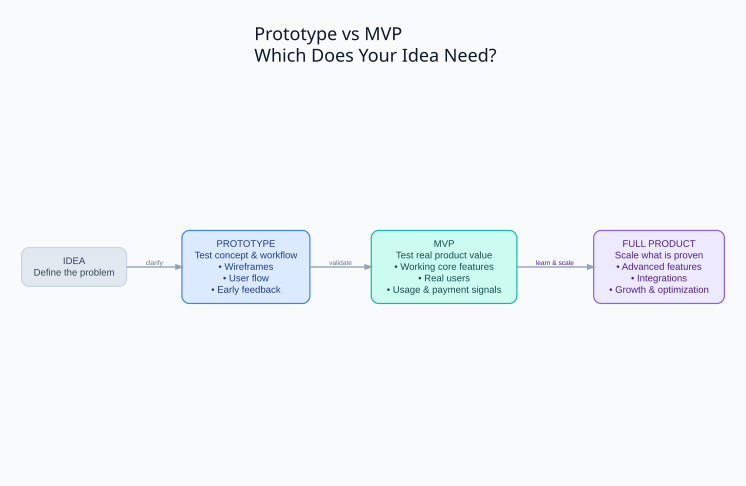
Idea → Prototype → Validate Workflow → MVP → Real Users → Improve → Full Product
The prototype reduces the risk of building the wrong workflow. The MVP reduces the risk of building the wrong product. They are not competing approaches; they are different tools for different uncertainties.
Use Mature Components Instead of Rebuilding Commodity Systems
A prototype may show how authentication, payments, subscriptions, email, file storage, analytics, scheduling, or notifications fit into the user flow. That does not mean the production product should later rebuild those systems from zero.
Before moving into MVP development, review which parts can be handled by established packages, APIs, plugins, frameworks, or existing software. Custom development should focus on the parts that actually make the product different.
This is closely related to the decision covered in custom software vs off-the-shelf software.
What Should Be Clear Before Moving From Prototype to MVP?
You do not need to finalize every future feature. But the team should understand the primary user, the problem being solved, the main workflow, the essential data, the core user actions, the critical integrations, and what outcome will demonstrate that the MVP is useful.
If those points are still changing dramatically after every conversation, another short prototype iteration may be cheaper than rewriting production software later.
What Should an MVP Include After the Prototype?
The MVP should contain the smallest complete production workflow that demonstrates the product’s main value. Small scope does not mean poor reliability.
If users need accounts, authentication should work. If they store important information, the data should be handled reliably. If payments are central to the product, payments should actually work. If notifications are required to complete the process, users should receive them.
Prototype and MVP Costs Should Be Considered Separately
A prototype mainly buys clarity. An MVP buys a real production system plus real-world feedback. They should therefore be scoped and priced as different stages.
MVP cost depends on production requirements such as authentication, permissions, integrations, payments, data complexity, automation, security, infrastructure, testing, and support. For a broader breakdown, see our guide to custom software development cost.
Avoid the “Everything Must Be in Version One” Trap
Once an idea becomes visible in a prototype, it is easy for the first version to grow. A dashboard suggests advanced analytics. User accounts suggest complex team permissions. Notifications suggest automation. Profiles suggest messaging.
The prototype should help you do the opposite: separate what proves the core idea from what could improve the product later.
What Happens After the MVP?
The MVP is not the end of product development. It is the beginning of evidence-based development. Real usage should guide what comes next.
You may discover that a feature you considered essential is barely used, while another becomes more important than expected. Onboarding may matter more than another major module. Integrations may create more value than advanced customization.
Choosing a Development Partner for the Next Stage
Moving from prototype to MVP is where technical decisions become much more important. The development team should not simply reproduce every prototype screen. It should help decide what can be reused, what should be integrated, what genuinely needs custom development, and which parts should remain deliberately simple in version one.
If you are evaluating developers or agencies for this stage, see how to choose a software development partner.
Prototype vs MVP: Which One Does Your Idea Need?
If your main uncertainty is navigation, workflow, product structure, or user experience, start with a prototype. If the workflow is already understood and the main uncertainty is whether real users will adopt, use, or pay for the product, move to an MVP.
If both are uncertain, prototype first and build the MVP second. If you are digitizing a proven process with well-understood requirements, you may be able to skip a dedicated prototype and move directly into a carefully scoped production release.
The goal is not to follow a fashionable product-development process. The goal is to use the smallest stage that answers the next important question.
Planning a SaaS or App?
If you already have a software idea but are unsure whether you need a prototype, an MVP, or a larger first release, define the uncertainty before defining the feature list.
SiteLumo can help review the idea, separate interface questions from product-validation questions, identify mature existing technology that can be reused, and define a practical path from Prototype → MVP → Full Product.
If you are ready to define the first version, request a quote with the problem you want to solve, the users you are building for, and the features you currently have in mind.