
If you have an idea for a SaaS platform, web application, mobile app, or internal software system, the MVP vs full product decision is one of the first choices that can shape your budget, launch speed, and product risk.
Should you build a Minimum Viable Product first, or go straight to the full product?
It is tempting to believe that more features will make a product more valuable. But building everything before real users have tested the core idea can increase cost, extend development time, and make mistakes much more expensive to fix.
At the same time, an MVP is not automatically the right answer for every project.
The right choice depends on what you already know about the market, how complex the product is, what users expect, and what you actually need to prove.
This guide explains the difference between an MVP and a full product, when each approach makes sense, and how to decide what to build first.
What Is an MVP?
An MVP, or Minimum Viable Product, is the smallest usable version of a product that solves the main problem for its intended users.
The important word is viable.
An MVP should not simply be an unfinished application with half of its features broken. It should provide enough value for a real user to complete the product’s main task.
For example, imagine you want to build a SaaS appointment scheduling platform.
The eventual full product might include:
- User accounts
- Appointment booking
- Multiple staff calendars
- Email and SMS reminders
- Online payments
- Customer management
- Analytics
- Team permissions
- Mobile apps
- Integrations
- Subscription plans
- Advanced automation
An MVP may initially contain only:
- User registration
- A basic availability calendar
- Appointment booking
- Booking management
- Basic email notifications
- A simple admin area
That smaller version can already answer an important question:
Will people actually use this product to manage appointments?
You can add the remaining features after the core workflow has been validated.
What Is a Full Product?
A full product is a more complete version designed to cover most of the expected user experience from launch.
It normally includes more functionality, more polished interfaces, broader integrations, additional automation, stronger administrative controls, and more edge-case handling.
Using the same scheduling platform example, the full version might launch with payments, multiple staff members, analytics, integrations, subscriptions, advanced permissions, and automated reminders already available.
This can provide a stronger first impression.
But it also means committing significantly more development time and money before you have much real-world feedback.
That is the central trade-off.
MVP vs Full Product: The Main Differences
| Factor | MVP | Full Product |
|---|---|---|
| Initial scope | Core features only | Broad feature set |
| Development time | Usually shorter | Usually longer |
| Initial investment | Lower | Higher |
| Speed to market | Faster | Slower |
| User feedback | Collected earlier | Collected later |
| Risk of unnecessary features | Lower | Higher |
| Launch polish | Functional but focused | Usually more complete |
| Ability to change direction | Easier | More expensive |
| Best suited for | Validation and early launch | Well-understood products and mature requirements |
Neither approach is automatically better.
The question is how much uncertainty exists before development begins.
When You Should Build an MVP First
For many new SaaS products and startup applications, an MVP is usually the safer starting point. Recent GoodFirms research on MVP adoption also highlights validation, faster release, customer feedback, and reduced strategic risk as common reasons businesses use the approach.
1. You Have an Idea but Not Enough User Validation
An idea can sound excellent internally and still fail when real customers see it.
Users may not care about the problem as much as expected.
They may already solve it differently.
They may want a different workflow.
Or they may like the idea but refuse to pay for it.
Building an MVP allows you to test those assumptions before investing heavily in secondary functionality.
2. You Are Entering a New Market
If you have never sold to the target audience before, there are usually many unknowns.
You may not yet know:
- Which feature users value most
- What they are willing to pay for
- Which workflow feels natural
- Which integrations matter
- What objections prevent purchase
- Which features sound useful but are rarely used
A smaller first release gives you room to learn.
3. Your Budget Is Limited
A full application can become expensive quickly because every additional feature creates more than just development work.
It may also require:
- Additional interface design
- Database changes
- Permissions
- Error handling
- Testing
- Mobile responsiveness
- Notifications
- Integrations
- Security checks
- Administration tools
- Future maintenance
Reducing the first version to the most important workflow can make a project significantly more manageable.
4. You Need to Launch Quickly
Sometimes speed matters more than completeness.
You may want to:
- Test demand
- Start onboarding early customers
- Demonstrate the product to investors
- Validate pricing
- Enter a market before competitors
- Replace a manual process
An MVP allows development effort to stay focused on what is required for the first usable release.
5. The Product Requirements Are Still Changing
If you are still regularly saying:
“Maybe we should also add…”
that is usually a warning against building the full product immediately.
Software becomes much more expensive when major workflows change after large amounts of functionality have already been built.
An MVP gives you a smaller foundation to adjust.
When Building More Than an MVP Can Make Sense
There are also situations where launching an extremely small MVP would be the wrong decision.
1. The Product Replaces an Existing Proven System
Imagine you already operate a business using spreadsheets, forms, email, and several disconnected tools.
You know exactly how the process works because your team performs it every day.
In that situation, you may not need to validate whether the workflow exists.
The purpose of the software is to replace a known process.
Building a larger first version can therefore make sense.
2. Users Expect Certain Features From Day One
Some markets have minimum expectations.
For example, a serious customer portal may need authentication, permissions, notifications, account management, security controls, and administrative tools simply to be usable.
Removing too much functionality could create an MVP that technically works but does not provide a credible user experience.
The correct approach is not necessarily to eliminate these features.
Instead, reduce complexity inside each feature.
3. You Already Have Strong Market Validation
Perhaps you already have:
- Paying customers waiting
- A successful manual service
- An existing product being rebuilt
- Signed contracts
- Extensive customer interviews
- A validated competitor model
- Internal users with clear requirements
The more evidence you already have, the less uncertainty the MVP needs to resolve.
4. Failure Would Create Serious Business Problems
Some applications cannot safely launch as a highly simplified experiment.
Systems involving sensitive business operations, complex permissions, financial workflows, regulatory requirements, or critical operational data may require a more complete foundation before real-world use.
Even then, scope can still be controlled.
The difference is that certain foundational requirements cannot simply be postponed.
The Biggest Mistake: Treating an MVP as a Cheap Full Product
One of the most common problems in software projects is trying to build a full product while calling it an MVP.
The feature list starts small.
Then someone adds:
- Advanced dashboards
- AI features
- Custom reporting
- Multiple user roles
- Mobile applications
- Complex integrations
- Chat
- Automation
- Referral systems
- Affiliate systems
- Notifications
- Billing
- Multiple subscription tiers
- Admin analytics
Soon the supposed MVP contains almost everything planned for version three.
At that point, the main advantage of an MVP has disappeared.
A better question for every feature is:
Do we need this feature to test whether users want the core product?
If the answer is no, it may belong in a later release.
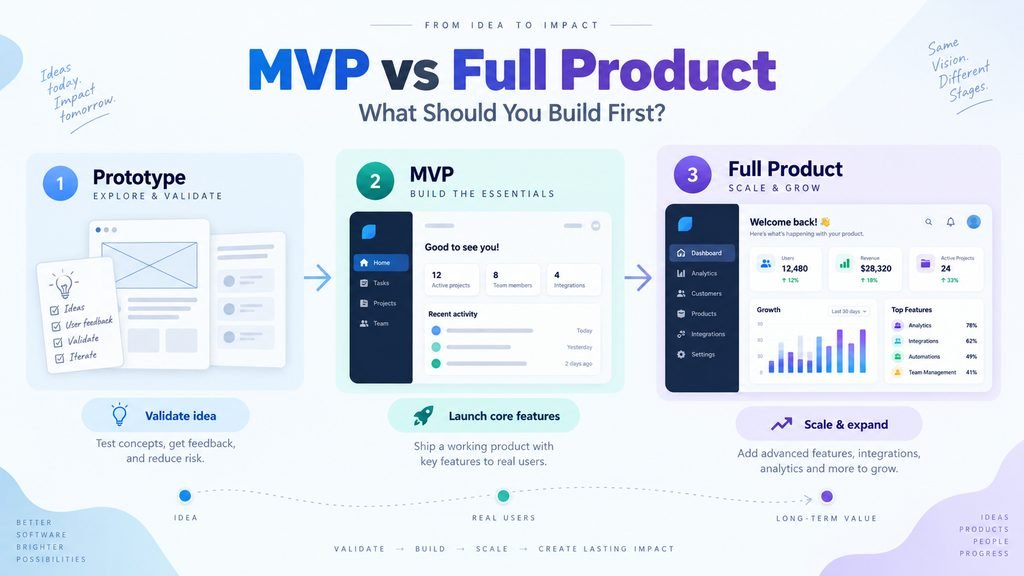
Prototype vs MVP vs Full Product
These stages are sometimes confused, but they solve different problems.
Prototype
A prototype demonstrates how the product could work.
It may include clickable screens or a limited interface without a complete production backend.
The goal is usually to validate:
- Layout
- Workflow
- Navigation
- User experience
- Product concept
Users may be able to explore it, but it is not necessarily a real production application.
MVP
The MVP is a functional product.
Real users should be able to perform the primary workflow.
The goal is to validate actual usage and demand.
Full Product
The full product expands the validated foundation.
This is where you add functionality based on actual customer needs rather than assumptions.
A sensible development path often looks like:
Prototype → MVP → Real User Feedback → Improvements → Full Product
Not every project requires every stage, but this sequence reduces unnecessary risk for many new products.
How to Decide What Goes Into Your MVP
Start with the problem, not the feature list.
Ask yourself:
What is the single most important result users need from this product?
Then map the shortest complete workflow required to achieve that result.
For example, a marketplace may initially need:
- User registration
- Listing creation
- Listing browsing
- Basic search
- Contact or transaction workflow
- Administration
It may not initially need:
- Advanced recommendations
- Complex reputation scoring
- Referral programs
- Native mobile applications
- Multiple membership tiers
- AI matching
- Advanced analytics
Those may become valuable later.
But they should earn their place through evidence.
Use Existing Technology Instead of Rebuilding Everything
Building an MVP does not mean every component should be custom-developed.
In many projects, mature existing solutions can handle common functionality such as:
- Authentication
- Payments
- Subscriptions
- Notifications
- Search
- File storage
- Analytics
- CMS functionality
- Customer support
- Scheduling
- Administration
Using mature packages, APIs, plugins, frameworks, and existing systems can reduce development time and leave custom development focused on the part of the product that actually makes it different.
For an MVP in particular, this can be extremely valuable.
There is little benefit in spending weeks rebuilding a commodity feature if a proven solution already exists.
How to Avoid Building an MVP That Is Too Small
There is another extreme.
Some teams remove so much from an MVP that the product can no longer demonstrate its actual value.
A good MVP must still provide a complete core experience.
For example, if the key benefit of your product is automatically processing customer requests, launching a version where users still have to manually process everything may not properly test the idea.
The goal is not:
“What is the cheapest thing we can launch?”
The better question is:
“What is the smallest product that can genuinely prove the core value proposition?”
That distinction matters.
Plan the Full Product Before Building the MVP
An MVP should have limited functionality, but that does not mean development should happen without planning.
Before development begins, it is useful to understand the likely future direction of:
- User roles
- Data structure
- Integrations
- Billing
- Permissions
- Core workflows
- Scalability requirements
- Administration
- Future features
You do not have to build everything now.
But knowing where the product may go can prevent decisions that make future expansion unnecessarily difficult.
Think of the MVP as the first usable section of a larger roadmap, not a disposable experiment.
A Practical Development Roadmap
For many new SaaS and application projects, a practical roadmap looks like this:
Phase 1: Define the Problem
Clarify:
- Who the product is for
- What problem it solves
- Why existing solutions are insufficient
- What action represents success for the user
Phase 2: Define the Core Workflow
Remove everything that does not support the central user journey.
Phase 3: Review Existing Solutions
Before custom development begins, check whether mature tools, packages, APIs, plugins, or open-source systems already solve parts of the project.
Phase 4: Prototype When Necessary
For complex interfaces or uncertain workflows, validate the user experience before investing heavily in backend development.
Phase 5: Build the MVP
Implement the smallest reliable production version that provides the core value.
Phase 6: Put It in Front of Real Users
Observe what users actually do rather than relying only on what they say they want.
Phase 7: Improve Based on Evidence
Add features when usage, customer requests, revenue, or operational requirements justify them.
Phase 8: Grow Toward the Full Product
The full product should emerge from validated requirements rather than an early wish list.
So, Should You Build an MVP or a Full Product?
If you are creating a completely new SaaS product or application and still have major assumptions to validate, starting with an MVP is usually the more practical approach.
If the workflow is already proven, users are waiting, requirements are well understood, or the product cannot provide meaningful value without a broader feature set, a more complete first release may make sense.
The goal is not to build as little as possible.
And it is not to build everything you can imagine.
The goal is to build enough to reach the next important business decision without spending heavily on features that have not yet proved their value.
Planning a SaaS or App?
If you already have an idea but are unsure what belongs in the first version, defining the scope before development can save substantial time and rework.
SiteLumo can help review your idea, separate core functionality from later-stage features, identify mature existing components that can be reused, and plan a practical path from prototype to MVP to full product.
Start with the problem you want to solve, the users you want to serve, and the features you currently have in mind.
We can then help turn that into a clearer development scope before unnecessary complexity gets built.
Related reading: custom software development costs, choosing a software development partner, and custom vs off-the-shelf software.