
The custom software vs off-the-shelf software decision can look like a technical decision.
It usually is not.
It is primarily a business decision about cost, speed, flexibility, operational risk, and how much of your workflow actually needs to be unique.
Many businesses make one of two mistakes.
Some immediately assume they need custom software because their current process feels complicated. They begin planning dashboards, databases, user roles, automation, reporting, and integrations from scratch—only to discover that mature software already provides most of what they need.
Others do the opposite. They force their operations into an existing product that was never designed for their workflow, creating spreadsheets, manual workarounds, duplicate data entry, and increasingly complicated processes.
The better question is not:
“Should we build or buy?”
It is:
“Which parts should we buy, which parts should we configure, which parts should we integrate, and which parts genuinely need to be custom?”
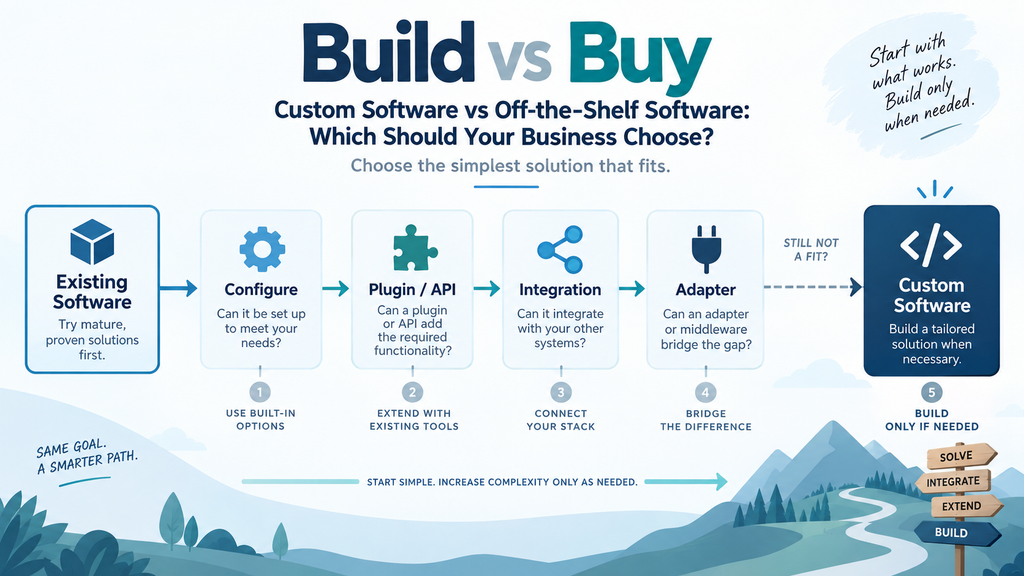
For many businesses, the best answer is somewhere in the middle.
What Is Off-the-Shelf Software?
Off-the-shelf software is software created for a broad group of customers rather than specifically for one organization.
Examples include:
- CRM platforms
- Accounting systems
- Help desk software
- Project management tools
- E-commerce platforms
- Booking systems
- Email marketing platforms
- ERP systems
- CMS platforms
- File management systems
- HR software
- Inventory systems
- Automation platforms
Instead of paying to design and develop the entire system yourself, you subscribe to or purchase an existing product and configure it for your organization.
Modern off-the-shelf software can often be extended through:
- plugins
- apps
- APIs
- webhooks
- workflow automation
- custom fields
- third-party integrations
- custom front ends
- small middleware services
That makes the difference between custom and off-the-shelf software much less absolute than it once was.
A business might use an existing CRM while building a small custom integration that connects it with its website, accounting platform, internal database, and customer portal.
The CRM remains off-the-shelf.
The integration layer is custom.
This hybrid model is increasingly practical.
What Is Custom Software?
Custom software is created specifically for the requirements of one organization or a narrowly defined business model.
Examples might include:
- a proprietary customer portal
- an internal operations platform
- a specialized quotation engine
- a custom manufacturing workflow
- a unique marketplace
- a business-specific scheduling system
- a specialized logistics application
- a proprietary SaaS product
- a custom integration layer connecting several systems
Custom software gives a company much more control over workflows, user experience, data structures, integrations, and future development.
But that flexibility comes with additional responsibility.
Someone must design, develop, test, deploy, secure, monitor, maintain, document, and upgrade the system.
Custom software is therefore rarely just a one-time development project.
It becomes a long-term software asset.
Custom Software vs Off-the-Shelf Software at a Glance
| Factor | Off-the-Shelf Software | Custom Software |
|---|---|---|
| Launch speed | Usually faster | Usually slower |
| Initial complexity | Lower | Higher |
| Upfront investment | Usually lower | Usually higher |
| Customization | Limited to available options and integrations | Extensive |
| Maintenance | Mostly handled by vendor | Your responsibility |
| Updates | Provided by vendor | Must be planned and developed |
| Business fit | Designed for common workflows | Designed around your workflow |
| Integrations | Depends on APIs and ecosystem | Can be designed specifically |
| Scalability | Depends on vendor architecture and plans | Can be designed around expected growth |
| Ownership | Usually licensed/subscription access | Potentially full ownership, depending on contract |
| Vendor dependency | Higher | Lower in some areas, but development dependency remains |
| Development risk | Lower initially | Higher |
| Competitive differentiation | Limited | Potentially significant |
| Best use | Common business functions | Unique or strategically important workflows |
Neither option is automatically better.
The correct choice depends on the problem.
Start With the Most Important Question: Is This Problem Actually Unique?
Before commissioning custom development, determine whether the business requirement is genuinely unusual.
Many requirements sound unique when described using company-specific terminology.
For example:
“We need a system where customers submit requests, staff review them, managers approve them, invoices are generated, files are stored, and notifications are sent.”
Internally, this may feel like a highly specialized workflow.
Technically, however, it contains several extremely common functions:
- form submission
- workflow management
- permissions
- approval
- document storage
- invoicing
- notifications
There are mature systems for all of them.
The business may not need six months of custom development.
It might need:
an existing platform + configuration + several integrations + a small amount of custom logic.
This distinction can save enormous amounts of time and technical risk.
When Off-the-Shelf Software Is Usually the Better Choice
1. The Function Is Already a Mature Software Category
Some software categories have been developed and refined for decades.
Examples include:
- CRM
- accounting
- invoicing
- help desk systems
- project management
- CMS
- e-commerce
- email marketing
- appointment booking
- authentication
- payments
- subscriptions
- file storage
- analytics
Building these systems from scratch rarely gives a typical small or medium-sized business a competitive advantage.
Consider authentication. The OWASP Authentication Cheat Sheet shows how quickly login security expands beyond simply storing an email address and password.
A seemingly simple login system can eventually require:
- password recovery
- email verification
- multi-factor authentication
- session management
- account locking
- suspicious login detection
- OAuth
- permission management
- security logging
This is not a useful place for most businesses to reinvent infrastructure.
The same applies to payments.
If established payment providers already handle card processing, refunds, subscriptions, fraud prevention, tax integrations, and regulatory requirements, developing your own equivalent would usually create unnecessary risk.
2. You Need to Launch Quickly
Existing software can often be configured in days or weeks rather than developed over months.
That difference matters when a company is:
- testing a new business idea
- launching a new service
- replacing spreadsheets
- trying to fix an immediate operational bottleneck
- validating customer demand
A perfect custom platform that arrives six months too late may be less useful than a good existing platform launched this month.
This is particularly important for startups.
Before building extensive proprietary systems, it is usually better to validate whether customers actually want the product or service.
3. Your Requirements Are Mostly Standard
Suppose a company needs:
- contacts
- leads
- sales stages
- email tracking
- notes
- reminders
- basic automation
- sales reporting
That is fundamentally a CRM problem.
The company may have several unusual fields or processes, but those differences do not necessarily justify developing a CRM from scratch.
A mature CRM with custom fields, workflow automation, and integrations may cover the requirement.
The business should reserve custom development for the small portion that the CRM cannot reasonably support.
4. You Do Not Want to Maintain a Software Product
Owning custom software means owning its problems.
Over time, software may require:
- security patches
- dependency updates
- server maintenance
- browser compatibility updates
- API migrations
- database optimization
- bug fixes
- performance improvements
- backup monitoring
- new integrations
- user support
With SaaS software, much of this responsibility belongs to the vendor.
That does not eliminate risk, but it significantly reduces the technical burden on your organization.
5. Your Budget Should Go Toward Differentiation
Development resources are limited.
If your business has money available for custom software, ask where custom development creates the greatest competitive advantage.
For example, imagine an online retailer.
Building a payment processor from scratch probably provides little competitive advantage.
Building a proprietary recommendation system based on unusual customer behavior might.
Therefore:
Buy commodity infrastructure. Build differentiating capabilities.
That principle works across many industries.
When Custom Software Makes More Sense
There are situations where custom development is absolutely justified.
1. The Workflow Is Central to Your Competitive Advantage
If your software implements something competitors cannot easily reproduce using existing tools, custom development may become strategically valuable.
Examples include:
- proprietary pricing algorithms
- specialized logistics optimization
- unusual manufacturing workflows
- custom recommendation engines
- unique marketplace mechanisms
- industry-specific decision systems
In these situations, forcing the process into generic software could eliminate the advantage you are trying to create.
2. Existing Software Requires Too Many Workarounds
A common warning sign is when an organization needs:
- dozens of spreadsheets
- repeated manual exports
- copy-and-paste between platforms
- complicated Zapier or Make workflows
- duplicate databases
- constant manual reconciliation
- employees remembering unusual procedures
At some point, the cost of the workaround architecture becomes greater than the cost of building the missing functionality.
This does not necessarily mean replacing every system.
Often the better solution is building a custom operational layer that connects existing systems.
3. The Software Must Match a Highly Specialized Process
Certain industries have workflows that mainstream software does not handle well.
Imagine a company that must process jobs using:
- customer-specific technical requirements
- unusual approval sequences
- complex pricing logic
- equipment availability
- specialized regulatory documents
- custom production stages
- customer-specific reporting
If no established platform reasonably supports that workflow, custom software may simplify operations dramatically.
4. Integration Limitations Have Become a Serious Problem
Sometimes individual systems work well but do not communicate properly.
A company might use:
- Shopify
- HubSpot
- an ERP
- a warehouse system
- an internal database
- a shipping provider
Replacing all of them would be unnecessary.
Instead, a custom integration layer could synchronize:
- products
- inventory
- customers
- orders
- invoices
- shipment status
This is technically custom software, but it avoids rebuilding mature systems.
For many companies, this is the most sensible kind of custom development.
5. Your Product Is the Software
If you are building a SaaS business, marketplace, application, or digital platform, custom development becomes much more important.
Your software is no longer merely supporting the business.
It is the business.
Even then, that does not mean everything should be built from scratch.
A SaaS product may still rely on:
- Stripe for payments
- Auth0 or another authentication service
- AWS or another cloud provider
- SendGrid for transactional email
- existing analytics platforms
- open-source components
- third-party AI APIs
Your development team should focus custom engineering on the parts that make the product unique.
The Often-Better Third Option: Off-the-Shelf Software + Custom Integration
Businesses frequently assume there are only two choices:
Buy software
or
Build software.
There is a third option:
Buy the mature parts and build only the missing layer.
For many small and medium-sized companies, this is the strongest architecture.
Imagine a company needs:
- website lead capture
- CRM
- automated qualification
- proposals
- invoices
- customer support
- internal workflow
- analytics
Instead of developing one enormous platform, it might combine:
Website → CRM → Automation → Accounting → Help Desk
APIs or automation tools synchronize the systems.
A small custom service handles unusual business rules.
The architecture might look like this:
Existing System A
↓
API / Webhook
↓
Custom Adapter
↓
Existing System B
The custom code remains small.
That produces several benefits:
- faster launch
- less code to maintain
- lower development risk
- access to mature features
- easier upgrades
- lower security burden
This is often better engineering than building a monolithic custom platform.
What Is an Adapter?
An adapter is a relatively small layer of software that allows two systems with different structures to work together.
Suppose System A calls customers:
customers
but System B calls them:
contacts.
Their data structures may also differ.
System A might store:
- first_name
- last_name
- company
System B might expect:
- full_name
- organization
The adapter converts the data between them.
It may also handle:
- authentication
- validation
- retries
- error logging
- field mapping
- rate limits
Instead of replacing either system, the adapter allows both to remain in place.
This can turn an almost-suitable software product into a very good business solution.
The Real Cost of Custom Software
Businesses often compare only subscription fees with development costs.
That comparison is incomplete.
The total cost of custom software may include:
Discovery
Someone must determine:
- what the system actually needs
- which workflows matter
- user roles
- permissions
- integrations
- data models
- success criteria
Design
The project may require:
- information architecture
- UX design
- interface design
- responsive layouts
- prototypes
Development
Developers must implement and integrate the features.
Testing
The system should be tested across:
- workflows
- user roles
- devices
- browsers
- failure scenarios
- permissions
- integrations
Deployment
The application needs infrastructure, configuration, monitoring, backups, and release processes.
Maintenance
Software continues to change after launch.
Future Development
Users eventually request:
- new reports
- integrations
- automation
- workflows
- permissions
- mobile improvements
Custom software should therefore be treated as an ongoing operational asset, not simply an initial project.
The Hidden Cost of Off-the-Shelf Software
Existing software also has costs that are easy to underestimate.
These can include:
- subscription increases
- per-user pricing
- feature limitations
- API restrictions
- automation limits
- storage limits
- integration fees
- migration difficulty
- vendor lock-in
- required higher-tier plans
A low-cost tool can become expensive as the organization grows.
Therefore, businesses should compare three-to-five-year operating costs, not just the first invoice.
Vendor Lock-In vs Development Lock-In
Vendor lock-in is frequently mentioned as an argument for custom software.
It is a legitimate concern.
But custom software introduces another type of dependency:
development lock-in.
If only one developer understands a poorly documented application, the company may become just as dependent on that developer as it would have been on a SaaS vendor.
Custom software should therefore include:
- documented architecture
- documented deployment
- source control
- access ownership
- database documentation
- environment documentation
- backup procedures
- clear licensing/IP terms
Good custom software reduces dependency.
Bad custom software simply replaces vendor lock-in with developer lock-in.
Security Considerations
Security is another area where the answer is not automatically “custom is safer.”
A mature software vendor may have:
- dedicated security teams
- penetration testing
- monitoring
- access controls
- audit logs
- backup infrastructure
- compliance programs
A small custom application may have none of these unless they are intentionally implemented.
On the other hand, relying on a vendor also means trusting its security practices and infrastructure.
The correct decision depends on:
- sensitivity of your data
- regulatory requirements
- access requirements
- vendor security practices
- your own engineering capabilities
For most ordinary business functions, mature established platforms are often safer than quickly built custom equivalents.
How to Evaluate an Off-the-Shelf Product
Do not judge software only from its marketing page.
Before selecting a system, evaluate:
Functional fit
Can it handle your essential workflow without excessive workarounds?
API quality
Can other systems communicate with it?
Webhooks
Can it notify other applications when events occur?
Data portability
Can you export your data in a usable format?
Permissions
Can you control access properly?
Ecosystem
Does it have useful integrations, plugins, or partners?
Reliability
Is the vendor established and actively maintaining the product?
Security
What security and backup capabilities are provided?
Pricing model
How does cost change when users, contacts, transactions, or usage increase?
Exit strategy
How difficult would migration be later?
The best software today can become the wrong software three years from now.
Your architecture should leave room to change.
How to Evaluate Whether Custom Development Is Worth It
Ask these questions.
Is the requirement truly unique?
If not, look harder for existing software.
Is it strategically important?
Custom development should usually support differentiation rather than commodity operations.
Can several mature products be combined?
A combination of existing tools may provide most of the desired outcome.
Can APIs or automation solve the gap?
A small integration is much easier to maintain than an entire platform.
Can requirements be adjusted?
Sometimes slightly changing the workflow allows the company to use a mature product.
That can be far more economical than developing software around an inefficient existing process.
Do we have long-term maintenance resources?
If nobody can maintain the system after launch, custom development creates future risk.
A Practical Build vs Buy Decision Framework
A simple decision process looks like this.
Step 1: Search for Existing Solutions
Before writing specifications for custom software, research:
- SaaS platforms
- open-source software
- plugins
- industry-specific systems
- APIs
- automation platforms
You may discover that most requirements already exist.
Step 2: Identify the Missing Requirements
Separate requirements into:
Must-have
and
Nice-to-have.
This prevents minor preferences from forcing unnecessary custom development.
Step 3: Test Configuration Before Development
Determine whether the missing functionality can be handled through:
- settings
- custom fields
- workflows
- plugins
- extensions
Step 4: Test Integration
If one product cannot handle everything, determine whether two mature systems can be connected.
Step 5: Consider a Small Adapter
Build only the missing integration or business logic.
Step 6: Consider Partial Custom Development
Develop one proprietary module around mature infrastructure.
Step 7: Only Then Consider a Fully Custom System
A full custom build should usually be the last option rather than the first.
Example: A Company Needs a Customer Management Platform
Suppose a company says:
“We need custom customer management software.”
The requirements include:
- contacts
- sales pipeline
- customer emails
- tasks
- invoices
- support tickets
- document storage
- management reports
This sounds substantial.
But these are mature software categories.
A better architecture might be:
CRM
for customer and sales management
Accounting software
for invoices
Help desk platform
for support
Cloud storage
for documents
Automation platform
for synchronization
Then perhaps one small custom dashboard combines the most important information.
Instead of building eight systems, the company builds one integration layer.
Example: A Manufacturer Has a Unique Quotation Process
Now consider a manufacturer.
Every quotation depends on:
- material
- machine availability
- dimensions
- production method
- quantity
- supplier prices
- shipping destination
- historical production data
Existing CRM tools can store leads and customers.
Accounting software can issue invoices.
But neither understands this specialized quotation model.
Here, the sensible architecture may be:
Existing CRM + Custom Quotation Engine + Existing Accounting System
This preserves mature commodity functionality while custom-building the part that actually differentiates the business.
Example: A Startup Is Building a SaaS Product
A startup should not interpret “custom software” as “build every technical component ourselves.”
Its architecture might use:
- managed hosting
- existing authentication
- Stripe
- transactional email APIs
- analytics tools
- cloud storage
- AI APIs
The startup then concentrates its engineering resources on its proprietary workflow and customer experience.
That is still custom software.
It is simply custom software built intelligently on top of mature infrastructure.
Should You Modify Your Business Process Instead?
This question is uncomfortable but important.
Sometimes companies request custom software because they want technology to preserve a complicated internal process.
But the process itself may be the problem.
For example:
Employee A exports a spreadsheet.
Employee B changes the spreadsheet.
Manager C approves it.
Employee D imports it into another system.
A company might ask for software that automates these four steps.
But perhaps the better solution is eliminating three of the steps entirely.
Before automating a workflow, simplify it.
Otherwise, custom software can make inefficient operations faster without making them better.
What Small Businesses Should Usually Do
For most small businesses, the default strategy should be:
Off-the-shelf first.
Then:
Configure → Integrate → Extend → Custom-build only where necessary.
A small company rarely benefits from maintaining its own:
- CRM
- authentication platform
- billing engine
- help desk
- project management system
- CMS
unless one of those functions is directly connected to its competitive advantage.
Engineering resources should be reserved for the areas where customization produces measurable business value.
What Growing Businesses Should Watch For
As a company grows, the balance may change.
An off-the-shelf system that worked well with five employees might become inefficient with fifty.
Warning signs include:
- excessive manual synchronization
- large numbers of integrations
- employees constantly exporting spreadsheets
- important data trapped in separate systems
- workflow limitations affecting customers
- expensive licensing at scale
- important business rules impossible to implement
At this stage, custom development may become economically justified.
But even then, replacing everything at once is risky.
Incremental replacement is usually safer.
Build vs Buy Is Not a Permanent Decision
Software architecture evolves.
A business might start with:
100% off-the-shelf software
then move to:
off-the-shelf + integrations
then:
off-the-shelf + proprietary modules
and eventually:
a mostly custom platform using third-party infrastructure.
This is normal.
The correct architecture today does not need to be the final architecture forever.
Businesses should optimize for the current stage while avoiding decisions that make future migration unnecessarily difficult.
Final Decision Checklist
Choose off-the-shelf software when:
- the requirement is common
- speed matters
- established solutions already exist
- maintenance resources are limited
- custom development would not create competitive advantage
Choose off-the-shelf + integration/custom adapter when:
- existing systems cover most requirements
- systems need better synchronization
- only a small part of the workflow is unusual
- you want to reduce development and maintenance risk
Choose custom software when:
- the workflow is genuinely unique
- it creates strategic advantage
- existing products require excessive workarounds
- integration cannot solve the important gaps
- you can support long-term development and maintenance
Conclusion
The strongest software strategy is rarely “build everything.”
It is also rarely “force everything into one existing product.”
The better approach is to identify which capabilities are already solved well by mature software and which capabilities genuinely deserve custom development.
For most businesses, the preferred order should be:
Use an existing solution → configure it → integrate it → add a small adapter → extend it → build custom software only where necessary.
This reduces cost, launch time, security exposure, and long-term maintenance while preserving custom development for the areas where it creates real business value.
The goal is not to own more code.
The goal is to build the simplest technology stack that supports the business effectively.
Related reading: custom software development costs, MVP vs full product planning, and choosing a software development partner.