
Planning a website is much easier when you know what pages you need and how those pages should connect.
That is what a website sitemap helps you figure out.
Before choosing layouts, writing page copy, or deciding what should go in the navigation menu, you can create a simple map of the website. It does not need special software, technical knowledge, or a complicated diagram.
For many small business websites, a sitemap can be planned on a piece of paper in a few minutes.
The important part is deciding what information visitors need, which pages should contain it, and how those pages should be organized.
This guide walks through that process step by step.
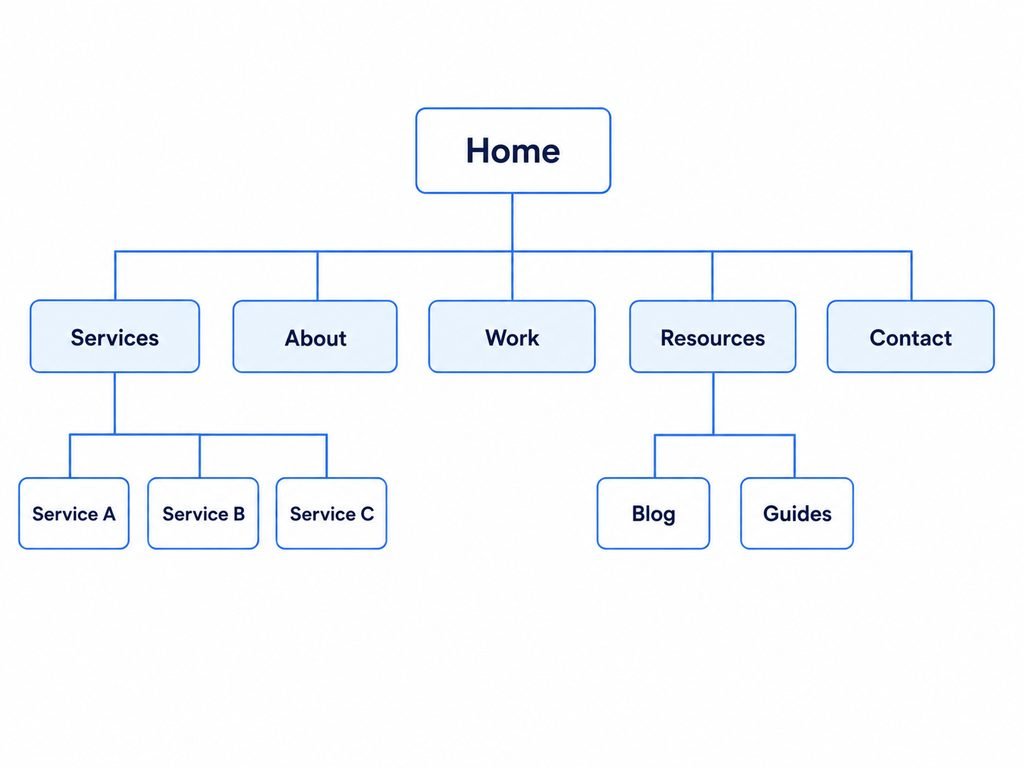
What Is a Website Sitemap?
The word “sitemap” can mean two different things.
An XML sitemap is a technical file that helps search engines discover URLs on a website.
That is not what we are planning here.
A visual website sitemap is a simple representation of the pages on your website and the relationships between them.
For example:
- Home
- Services
- Service A
- Service B
- Service C
- About
- Resources
- Blog
- Contact
- Services
This simple structure already tells you quite a lot.
You can see which pages are important, which pages belong together, and which pages should probably appear in the main navigation.
Think of it as the floor plan of your website.
You create the floor plan before worrying about the furniture.
Why Plan the Sitemap Before Designing the Website?
It is tempting to start a website by designing the homepage.
That often creates problems later.
You may finish a homepage and then realize you need several service pages. You may create too many navigation items. Important information may end up scattered across unrelated pages.
Planning the structure first helps separate two different decisions:
Website structure: What pages exist and how are they connected?
Page design: What does each individual page look like?
Structure should usually come first.
A good sitemap can help you:
- identify the pages the website actually needs;
- avoid creating unnecessary pages;
- organize related information together;
- make navigation easier to understand;
- plan content before design begins;
- identify missing information;
- create room for the website to grow later.
It also forces you to think about the website from a visitor’s perspective rather than only from the business owner’s perspective.
Step 1: Start With the Website’s Main Goal
Before deciding how many pages you need, be clear about the website’s primary goal and what it is supposed to accomplish.
A local service business might want visitors to request a quote.
A consultant might want potential clients to understand their expertise and make an inquiry.
A restaurant may want visitors to view its menu, location, opening hours, and reservation options.
An online store needs visitors to find and purchase products.
Different goals naturally lead to different structures.
For example, a business that offers one straightforward service may only need a few pages.
A company with twelve distinct services may need a Services section containing several individual pages.
Do not begin by asking:
“How many pages should my website have?”
Start with:
“What does a visitor need to know or do before the website has done its job?”
That question gives you a much better foundation for your sitemap.
Step 2: List the Questions Visitors Need Answered
Next, write down the main questions someone might have when they arrive at the website.
For a typical service business, these might include:
- What does this company do?
- Is this service suitable for me?
- What services are available?
- How does the process work?
- Why should I trust this business?
- Where does the business operate?
- How can I contact someone?
- What happens after I make an inquiry?
- Are there examples of previous work?
- Are common questions answered anywhere?
Do not think about pages yet.
Just collect the questions.
This prevents a common planning mistake: creating pages because other websites have them rather than because your visitors actually need them.
Once the important questions are visible, you can decide where the answers belong.
Step 3: Create the Smallest Useful Page List
Now turn those visitor questions into pages.
For many small service businesses, a first draft might look like this:
- Home
- Services
- About
- Contact
That is enough to start.
You can then ask whether any additional page has a clear purpose.
Perhaps you need:
- Individual Service pages
- Portfolio or Work
- Testimonials or Reviews
- FAQ
- Pricing
- Locations
- Blog or Resources
- Booking
- Shop
- Product Categories
- Case Studies
The goal is not to make the website as small as possible.
The goal is to make it as simple as possible without hiding information people genuinely need.
A five-page website with overloaded pages is not automatically simpler than a ten-page website with clearly organized information.
Page count is less important than clarity.
Step 4: Decide When a Topic Deserves Its Own Page
One of the most useful sitemap decisions is knowing when to separate information into its own page.
Suppose a landscaping company offers:
- Lawn care
- Garden design
- Tree trimming
- Patio installation
- Irrigation
Should everything appear on one Services page?
Maybe.
But if each service has enough useful information of its own, individual pages may make more sense.
A separate page becomes more useful when a topic has:
- a different audience;
- a different problem to solve;
- substantial information of its own;
- different examples or images;
- a different conversion action;
- enough detail that combining it with other topics would make the page difficult to scan.
For example:
Services
- Lawn Care
- Garden Design
- Tree Trimming
- Patio Installation
- Irrigation
This structure gives visitors a clear route to information about the specific service they need.
On the other hand, creating five separate pages containing only a short paragraph each would add complexity without adding much value.
Do not split pages simply to increase the number of pages on the website.
Split them when doing so makes the information genuinely easier to find or understand.
Step 5: Group Related Pages Together
Once you have your page list, start grouping related pages.
Imagine a business website with these pages:
- Home
- About
- Web Design
- Website Redesign
- Website Maintenance
- Services
- Contact
- Blog
- Website Guides
Instead of treating everything as the same level, organize them into sections:
Home
Services
- Web Design
- Website Redesign
- Website Maintenance
About
Resources
- Blog
- Website Guides
Contact
This creates hierarchy.
Visitors can understand that Web Design, Website Redesign, and Website Maintenance all belong to Services.
The same hierarchy can later help you plan menus, breadcrumbs, internal links, and URL structure.
Step 6: Keep the Hierarchy Shallow When Possible
A visitor should not have to understand a complicated organizational system just to find a basic page.
For a small business website, a structure such as this is usually easy to understand:
Home → Services → Individual Service
A structure like this is harder:
Home → Solutions → Industries → Business Solutions → Professional Services → Service
Deep structures are sometimes necessary on very large websites, but they should not be created without a reason.
Try to keep important content reasonably close to the main sections of the website.
That does not mean every page must appear directly in the main navigation.
It means the relationships between pages should remain understandable.
Step 7: Turn the Sitemap Into a Navigation Plan
Your sitemap and your navigation are related, but they are not identical.
A website may contain 30 pages without displaying 30 links in its main menu.
For example, the sitemap might contain:
- Home
- Services
- Website Design
- Website Redesign
- Ecommerce
- Website Maintenance
- Industries
- Restaurants
- Contractors
- Consultants
- About
- Work
- Blog
- Contact
- Privacy Policy
- Terms
The main navigation could still be:
Services | Industries | Work | About | Blog | Contact
Individual service and industry pages can appear inside dropdown menus or be reached through relevant pages.
Privacy Policy and Terms normally do not need prominent positions in the main navigation and can instead appear in the footer.
The sitemap describes the whole website.
The navigation shows visitors the most useful routes through it.
Step 8: Give Every Page a Clear Job
Now review each page in your sitemap and write down its purpose in one sentence.
For example:
| Page | Main Purpose |
|---|---|
| Home | Explain the business and guide visitors to the right next step |
| Services | Show the main services available |
| Individual Service | Explain one service in enough detail to help someone evaluate it |
| About | Explain who is behind the business and build confidence |
| Work | Show relevant examples or results |
| FAQ | Answer common questions that may prevent someone from taking action |
| Contact | Make it easy to start a conversation |
| Blog | Provide useful educational content |
If you cannot explain why a page exists, reconsider whether you need it.
Likewise, if one page appears to have six unrelated purposes, it may be trying to do too much.
This exercise is one of the easiest ways to clean up a sitemap.
Step 9: Check the Sitemap From a Visitor’s Perspective
Business owners often organize websites according to how the company operates internally.
Visitors may think differently.
Imagine a company with departments called:
- Client Solutions
- Strategic Operations
- Business Enablement
Those labels may make perfect sense inside the company.
A customer looking for bookkeeping, payroll, or tax preparation may have no idea where to click.
A sitemap should reflect how visitors look for information.
Ask:
- Would a first-time visitor understand these page names?
- Can someone quickly identify where the services are?
- Is important information buried beneath vague categories?
- Are similar pages grouped together?
- Are two pages covering almost the same subject?
- Is there a clear route from learning about the business to taking the next step?
Use obvious labels whenever possible.
“Services” is often better than a clever label that visitors have to interpret.
“Contact” is usually clearer than “Start a Conversation.”
Creativity can be valuable in design and branding. Navigation structure is usually a poor place to make people guess.
Step 10: Remove Unnecessary Pages
After building the first sitemap, remove anything that does not earn its place.
Common examples include:
A separate page for every tiny piece of information
Not every topic deserves its own page.
Business hours, phone numbers, and a short service-area statement can often fit naturally on existing pages.
Empty portfolio or testimonial pages
If you do not yet have meaningful content for them, an empty section can make the website feel unfinished.
You can add them later.
Pages created only because competitors have them
Another company’s website may serve a different audience, offer different services, or have a different marketing strategy.
Use competitors for research, not as a page-count template.
Duplicate pages
“Contact,” “Get in Touch,” and “Request Information” usually do not need to be three different general-purpose pages.
Thin service pages
If several service pages would each contain nearly identical information, consider whether they should be combined.
A smaller, clearer sitemap is often easier to maintain and easier for visitors to understand.
A Simple Sitemap Example for a Service Business
A straightforward service-business website might use this structure:
Home
Services
- Service A
- Service B
- Service C
About
Work
Resources
- Blog
- Guides
FAQ
Contact
Footer pages
- Privacy Policy
- Terms
There is nothing special about this exact structure.
A plumber, photographer, accountant, consultant, restaurant, software company, and online retailer may all need different pages.
The important principle is that every page should have a reason to exist and every important page should have a clear place in the structure.
What About a One-Page Website?
Not every business needs multiple pages.
A one-page website can work when the business is simple enough that visitors can understand the main offer without moving through several sections.
For example, one page might contain:
- Introduction
- Services
- Benefits
- About
- Testimonials
- FAQ
- Contact
You can still create a sitemap for a one-page website.
Instead of mapping separate pages, map the major sections of the page.
This is useful because a one-page website still needs information hierarchy.
The question is not whether the content exists on separate URLs.
The question is whether visitors can find and understand the information they need.
Should Blog Posts Appear in the Sitemap Plan?
You do not need to draw every future blog post individually.
Treat the blog or knowledge section as one branch of the main sitemap.
For example:
Resources
- Blog
- Guides
As content grows, individual articles can be organized through categories, topics, tags, internal links, and archive pages.
If you attempted to place hundreds of future articles on the original planning diagram, the sitemap would quickly become difficult to use.
Plan the permanent structure first.
Let the content library grow within that structure.
Should Every Page Be in the Main Menu?
No.
This is another reason not to treat the sitemap and navigation menu as the same thing.
Pages such as these may be useful without needing permanent space in the primary navigation:
- Privacy Policy
- Terms and Conditions
- Thank You pages
- Campaign landing pages
- Individual blog posts
- Individual case studies
- Individual location pages
- Individual service pages
The main menu should help visitors reach the website’s major sections.
Other pages can be reached through dropdowns, contextual links, buttons, related-content sections, search, or the footer.
Common Website Sitemap Mistakes
Starting with design instead of structure
Choosing a beautiful website template first can tempt you to force your content into whatever page structure came with the template.
Decide what the website needs before adapting the design.
Creating too many top-level menu items
If every page is treated as equally important, visitors have to process too many choices at once.
Group related pages into meaningful sections.
Using vague page names
Visitors should usually know what they will find before clicking.
Clear labels reduce unnecessary uncertainty.
Organizing everything around the company
Your organizational chart is not necessarily your customer’s mental model.
Structure the website around the information people are trying to find.
Making every service a separate page automatically
Separate pages are useful when they contain genuinely distinct information.
They are not useful simply because having more pages seems better.
Forgetting future growth
You do not need to build every future page today, but the structure should leave sensible places for new content.
For example, starting with a Services section makes it easier to add new individual services later.
You Do Not Need Sitemap Software to Start
There are dedicated sitemap and diagramming tools, but they are optional.
For a small website, you can plan the structure using:
- paper and a pen;
- sticky notes;
- a whiteboard;
- a spreadsheet;
- a basic diagram tool;
- a simple text outline.
The thinking matters more than the software.
A text outline like this is already a perfectly usable sitemap:
Home
├── Services
│ ├── Service A
│ ├── Service B
│ └── Service C
├── About
├── Work
├── Resources
│ ├── Blog
│ └── Guides
└── Contact
You can always turn it into a polished diagram later.
A Simple Website Sitemap Checklist
Before finalizing your sitemap, check the following:
- The website has a clear primary goal.
- Every important visitor question has somewhere to be answered.
- Every page has a clear purpose.
- Related pages are grouped together.
- Important pages are not buried unnecessarily deep.
- Navigation labels are easy to understand.
- Similar or duplicate pages have been combined where appropriate.
- Service pages are separated only when there is enough reason to separate them.
- Legal and utility pages are included without overcrowding the main navigation.
- The structure has room for future pages and content.
- A first-time visitor could understand the organization without knowing how the business works internally.
If those points are covered, the sitemap is probably ready for the next stage of website planning.
Final Thoughts
A sitemap does not have to be complicated.
For a small business website, its main job is to answer three questions:
What pages do we need?
How should those pages be grouped?
How will visitors move between them?
Solve those questions before spending too much time on layouts, colors, animations, or individual page designs.
A simple structure gives everything else a place to go.
And when the structure makes sense before the website is built, it is much easier to create pages that feel connected rather than assembling the website one page at a time.
Related reading: creating a website requirements checklist, planning a small business homepage, and planning a business website from start to launch.